5 Ways to Repurpose Transcribed Audio Content
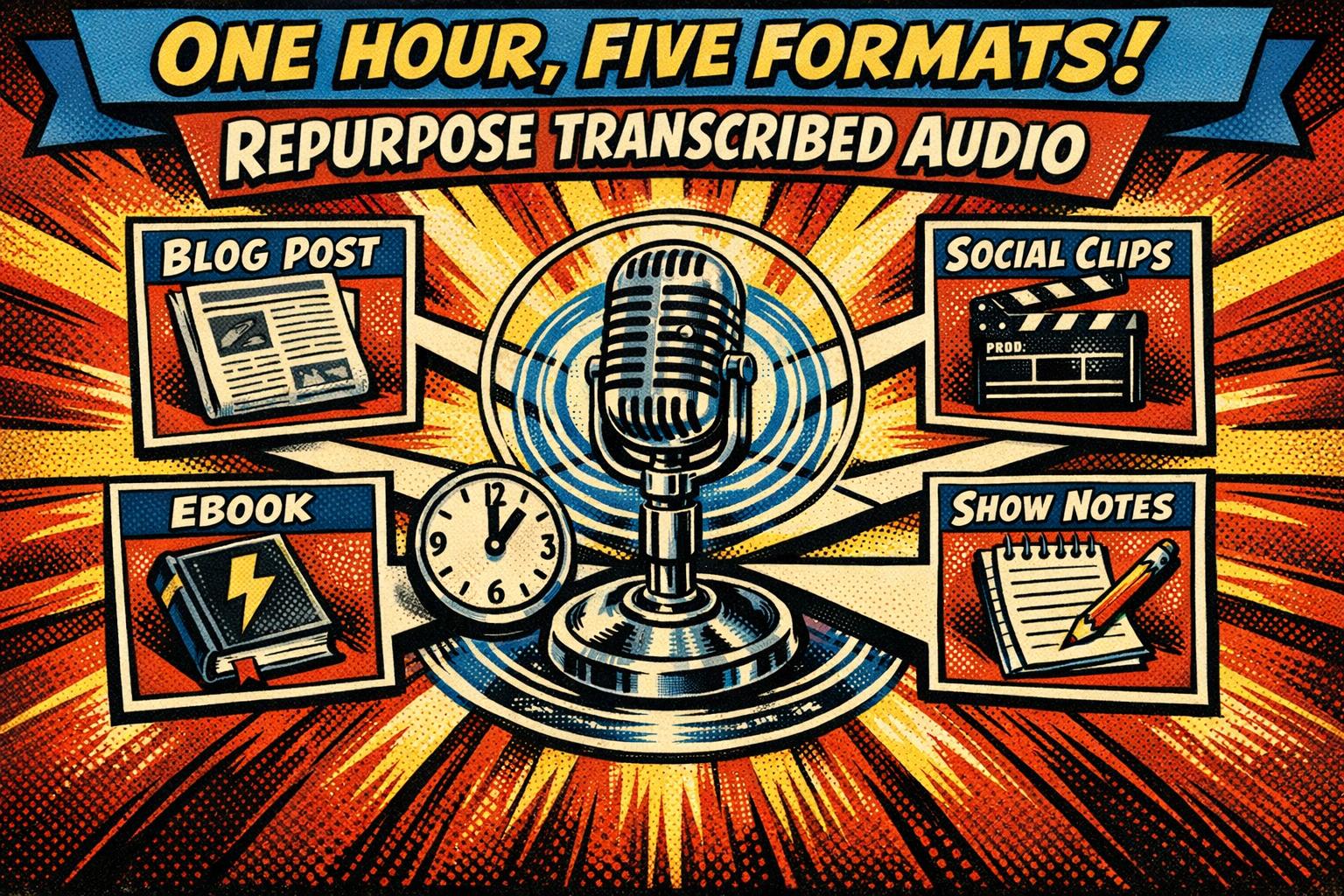
Your audio recordings are untapped content gold. A single hour of audio holds 8,000–10,000 words, enough to fuel blog posts, social media, newsletters, eBooks, and more. Yet, most people let these recordings sit idle. Here’s how you can transform them into tools that drive traffic, grow your audience, and generate income:
- Turn transcripts into blog posts: Clean up the text, focus on key themes, and optimize for readability and SEO.
- Extract social media content: Create short captions, quote graphics, and audiograms to share on platforms like TikTok or LinkedIn.
- Build eBooks or lead magnets: Use transcripts to create guides or resources that grow your email list or establish expertise.
- Write newsletters: Pull key insights or moments from transcripts to craft engaging, bite-sized emails.
- Create show notes and visuals: Use transcripts to produce summaries, timestamps, and infographics to increase discoverability.
AI tools make transcription fast and affordable, cutting hours of manual work down to minutes. Start repurposing your audio today to amplify your content’s reach and impact.
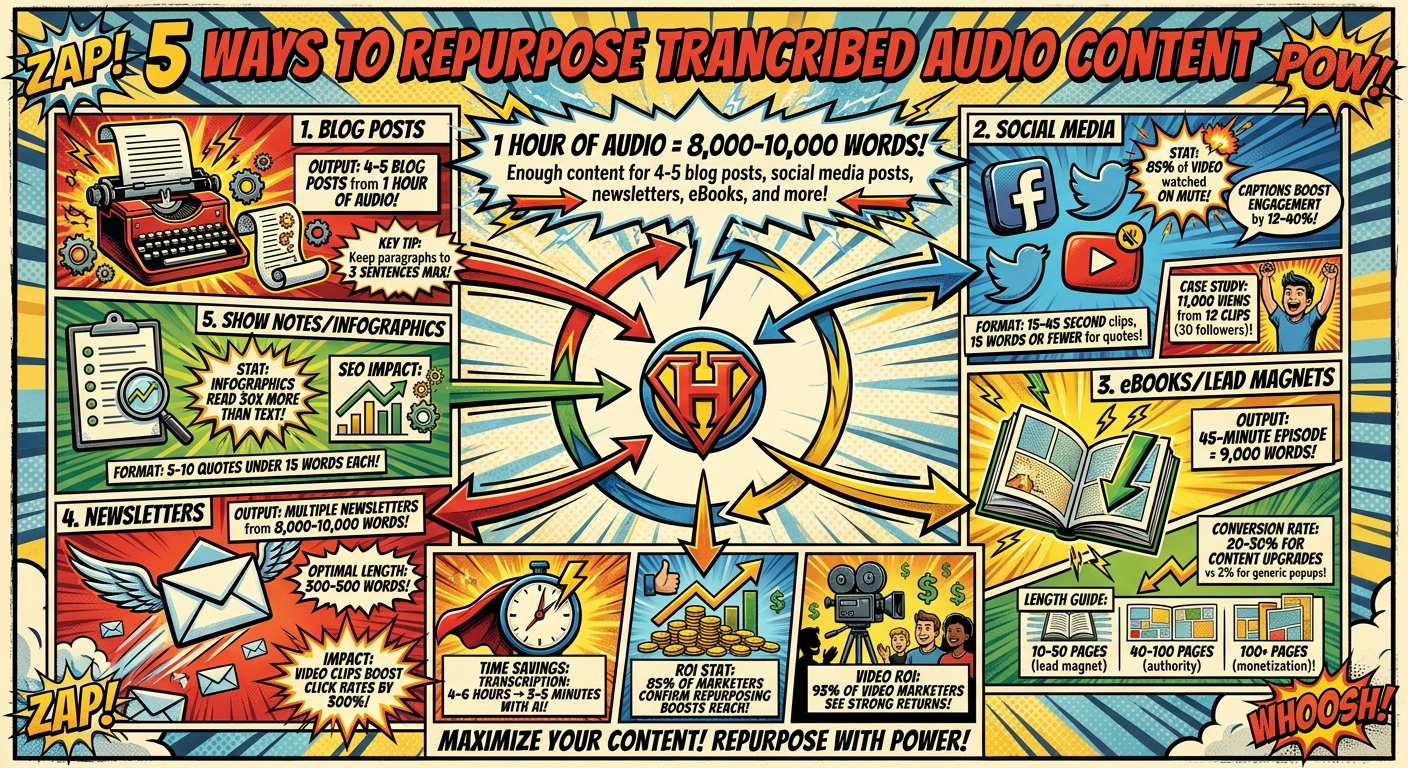
5 Ways to Repurpose Audio Transcripts: Content Output & Impact Statistics
1. Convert Transcripts into Blog Posts
Turning transcripts into blog posts is a smart way to stretch the value of your audio recordings. Think about it: an hour-long recording typically contains 8,000–10,000 words. That’s enough content to create four or five blog posts. But here’s the catch – you can’t just slap the raw transcript onto your site. To make it effective, you’ll need to clean it up. Remove filler words, cut out tangents, and tighten up sentences so they flow smoothly.
Start by zeroing in on one main theme to keep the post focused and relevant. If your recording touches on multiple topics, break it into separate posts for each idea. This not only improves clarity but also helps search engines better understand your content. Take it a step further by adding resource links, explaining technical terms, and including visuals to enhance the post.
"A blog post that looks easy to read gets read. A blog post that looks like a wall of text gets closed – no matter how good the content is." – CastNova
Formatting is everything. Dense blocks of text can scare readers away, so keep paragraphs short – three sentences max. Use H2 and H3 headings to structure your post, sprinkle in primary keywords, and include bulleted or numbered lists when explaining processes. These tweaks not only improve readability but also boost your SEO. Don’t forget to wrap things up with a strong call-to-action that encourages readers to engage with the full episode.
At Serve No Master, we specialize in teaching strategies that turn transcripts into traffic-driving blog posts. From keyword research to aligning with search intent and perfecting on-page formatting, we cover all the essentials to help your content get discovered and keep delivering organic traffic long after it’s published.
Ready to leave the job you hate and find the fastest path to online wealth? Learn the best asset you have right now to leverage income and build financial run way in my bestseller "Fire Your Boss." Click here to download the book for free.
2. Create Social Media Posts and Audiograms
Your podcast transcript isn’t just a script – it’s a goldmine of shareable content. By pulling out original insights, surprising facts, emotional stories, or counterintuitive ideas, you can craft posts that grab attention and encourage engagement on social media. The trick is to refine spoken language into short, punchy captions that stand on their own, giving your audience instant value without needing extra context. This approach takes your long-form audio and transforms it into bite-sized gems perfect for social platforms.
When designing quote graphics, stick to 15 words or fewer for mobile-friendly readability. Start your LinkedIn or X posts with the most attention-grabbing statement right at the top. For audiograms or video clips, aim for snippets between 15–45 seconds – long enough to intrigue but short enough to hold attention. And don’t forget captions. With 85% of social media video watched on mute, captioned clips can drive engagement by 12% to 40% more than their non-captioned counterparts.
Here’s a real-world example: Between November 2023 and February 2024, Erin Ollila, host of the Talk Copy to Me podcast, shifted from static audiograms to raw video clips on TikTok. Despite having just 30 followers, her 12 video clips racked up a combined 11,000 views, with some hitting 1,900 views in just a week. The lesson? Face-first video often performs better than static graphics on visually driven platforms.
If you’re not a video editing pro, no worries. Tools like Recast Studio and Audiogram (getaudiogram.com) make it easy to create waveform videos with auto-captions and export them in multiple formats for TikTok, Reels, and LinkedIn. Use vertical (9:16) for TikTok and Reels, square (1:1) for Instagram feeds, and landscape (16:9) for LinkedIn. Keep your designs clean – ditch the clutter and use high-contrast captions broken into easy-to-read chunks.
We help entrepreneurs build systems that simplify this entire process, from spotting the best clips to automating their distribution. With the right strategy, a single podcast episode can fuel weeks of engaging social media content.
3. Build eBooks or Lead Magnets
Your podcast transcripts are a goldmine for creating eBooks and lead magnets. A single 45-minute episode typically contains around 9,000 words – plenty to craft multiple eBooks or guides. By grouping transcripts by themes like email marketing, productivity tips, or client acquisition, you can effortlessly lay the groundwork for comprehensive resources without starting from scratch. This method streamlines content repurposing and maximizes the value of your existing material.
Once you’ve sorted your transcripts, tools like ChatGPT can help transform spoken words into polished, engaging text. Add introductions, summaries, checklists, and visuals to make the content more digestible and visually appealing. The key is to deliver practical, results-driven content that builds trust faster than generic advice.
For lead magnets, aim for concise guides between 10–50 pages that offer immediate value. If you’re looking to establish authority, extend your content to 40–100 pages for a more in-depth exploration.
| eBook Type | Ideal Length | Primary Goal |
|---|---|---|
| Lead Magnet / Mini-Guide | 10–50 pages | Capture emails; deliver actionable value |
| Authority-Building Guide | 40–100 pages | Establish expertise; deep dive into niche topics |
| Full-Scale eBook / Playbook | 100+ pages | Monetization; comprehensive industry reports |
Once your eBook is ready, gate it behind an email signup form to grow your subscriber list. Content upgrades – resources tied to specific topics – have conversion rates of 20–30%, far surpassing the typical 2% for generic popups. Entrepreneur Zack Liu sums it up perfectly:
"Done is better than perfect. A ‘good’ lead magnet that is live will always outperform a ‘perfect’ one that is still a draft".
To maximize impact, pair your lead magnet with an automated email sequence. Break the content into digestible pieces and weave in mentions of your paid offerings throughout the series.
At Serve No Master (https://servenomaster.com), we guide professionals in using AI to convert transcripts into high-value digital products. Turning transcripts into lead magnets is one of the quickest ways to grow your email list and connect free content to premium courses or coaching programs.
4. Write Newsletters and Email Campaigns
Did you know a one-hour audio transcript can give you 8,000 to 10,000 words of content? That’s enough to fuel multiple newsletters. But instead of overwhelming readers with a full summary, focus on the most surprising or counterintuitive moment from the transcript. As Podsuite explains:
"The best newsletter hook is usually something your guest said that surprised even you. If it caught you off guard during the recording, it’ll catch your readers off guard too."
Start your email with a quick one-paragraph summary, followed by three to five key takeaways in bullet points. Keep it short – 300 to 500 words is the sweet spot for easy reading. To keep your audience engaged, add something extra, like a personal insight, a related resource, or a follow-up idea. This not only makes your content more appealing but also sets the stage for deeper, segmented email campaigns.
Want to stretch your content further? Break a single transcript into a multi-part series tailored to different segments of your audience. For instance, you could send beginner-friendly how-to tips to one group, advanced Q&A highlights to another, or even translate the content for international subscribers.
Before hitting send, make sure the transcript is polished. AI tools can help by summarizing content and pulling out key quotes formatted specifically for email. Clean up fillers and wrap up with a clear call to action – whether it’s to listen, read, or download related material. Adding video clips or audiograms can take things up a notch, boosting click rates by as much as 300%.
Newsletters and email campaigns don’t just keep your audience informed – they expand your reach and build lasting relationships. At Serve No Master (https://servenomaster.com), we show professionals how to turn transcripts into automated email sequences that nurture leads and drive results. With the right strategy, one transcript can fuel weeks of subscriber engagement.
5. Create Show Notes and Infographics
Show notes do more than just guide your listeners to the best parts – they also help search engines find your content. With a transcript in hand, you don’t need to waste time re-listening to an hour of audio. You can quickly grab timestamps and key points right from the text.
Good show notes include several key elements: a compelling title (12–18 words), a short summary (100–150 words), timestamped chapters, 3–5 bulleted takeaways, and links to resources. Avoid boring, generic labels. Instead, use headers that show clear benefits, like "15:32 – Why most productivity systems fail within 30 days". This approach keeps visitors engaged by helping them quickly find what they care about, which reduces drop-off and keeps them coming back.
Infographics take it a step further by turning your data, steps, or quotes into eye-catching visuals. Pull out 5–10 short, punchy quotes (under 15 words each) for maximum readability. Did you know that infographics are read 30 times more often than plain text? Even captioned clips can boost engagement by 12–40%. Add the speaker’s name and your branding to these visuals to build credibility and make them more shareable.
These formats also make your content more accessible. Written show notes help people who are deaf, hard of hearing, or those who prefer reading over listening, such as non-native speakers. Plus, they turn your audio into searchable text, giving your organic reach a boost. One case study found that offering written versions increased inbound search traffic by 6.68% and inbound links by 3.89%.
At Serve No Master (https://servenomaster.com), we teach professionals how to turn one transcript into a treasure trove of high-impact content. This process not only saves time but also maximizes your discoverability and audience engagement.
Conclusion
Repurposing transcribed audio content isn’t just a clever trick – it’s a game-changing way to get the most out of your content investment. Think about it: a single hour of audio can produce 8,000–10,000 words. That’s enough for four or five in-depth blog posts, a handful of social media updates, a complete newsletter, and even chapters for an eBook. It’s like turning one piece of content into an entire ecosystem.
On top of that, automation has revolutionized the process. What used to take 4–6 hours of painstaking transcription can now be done in just 3–5 minutes. Tools today handle transcription, summarization, clipping, and formatting for you, giving you the freedom to focus on the bigger picture. This level of efficiency is a game-changer for anyone aiming to build a business that doesn’t tie them to a desk.
"Repurposing fuels your content ecosystem with minimal extra effort." – Amy Woods, Content Strategist
At Serve No Master, we specialize in helping professionals create these seamless, automated workflows. Through our AI-driven courses, we show you how to turn transcripts into a powerful content machine. The result? A business that practically runs itself, giving you the freedom to work from anywhere while reaching a wider audience.
With 85% of marketers confirming that repurposing boosts reach and engagement and 93% of video marketers seeing strong returns on video content, it’s clear: the question isn’t if you should repurpose – it’s how quickly you can automate and start scaling. Don’t wait – start streamlining your transcription and repurposing process now.
FAQs
How do I choose which transcript parts to repurpose first?
When repurposing content, zero in on the parts that truly grab attention – key insights, memorable quotes, or moments that strike a chord with your audience. These gems can be transformed into social media posts, blog content, or even eye-catching infographics. Focus on sections that emphasize the main ideas or offer a fresh perspective. This ensures your repurposed material stays engaging and hits the mark with your audience.
What’s the fastest workflow to turn one transcript into multiple content pieces?
The quickest way to streamline your content creation process is by using AI transcription tools to turn audio into text, then transforming that text into multiple formats. Here’s how it works:
- Transcribe audio fast: Use AI tools to convert your recordings into text in minutes.
- Craft a main content piece: Edit the transcript into something polished, like a blog post or article.
- Pull out key snippets: Highlight quotes or sections for social media, emails, or visual posts.
- Reformat for variety: Turn the content into videos, infographics, or other engaging formats.
This approach saves time and multiplies your content’s reach without doubling the effort.
How do I edit a transcript so it reads like writing, not speech?
To turn a transcript into polished writing, start by refining the text for clarity and natural flow. Play the audio while reviewing to correct any misheard words, punctuation mistakes, or awkward phrasing. Clean up grammar, remove filler words, and tweak the tone to align with written communication. Break up long paragraphs for better readability, include speaker labels if necessary, and reorganize the content to create a logical structure that’s ready for publication.
Related Blog Posts
- How Do I Create Passive Income Streams? 8 Answers
- Step-by-Step AI Podcast Workflow
- Ultimate Guide to AI Voiceovers for Video Creators
- AI Blog Editing: Key Benefits for Professionals 40+
Ready to leave the job you hate and find the fastest path to online wealth? Learn the best asset you have right now to leverage income and build financial run way in my bestseller "Fire Your Boss." Click here to download the book for free.