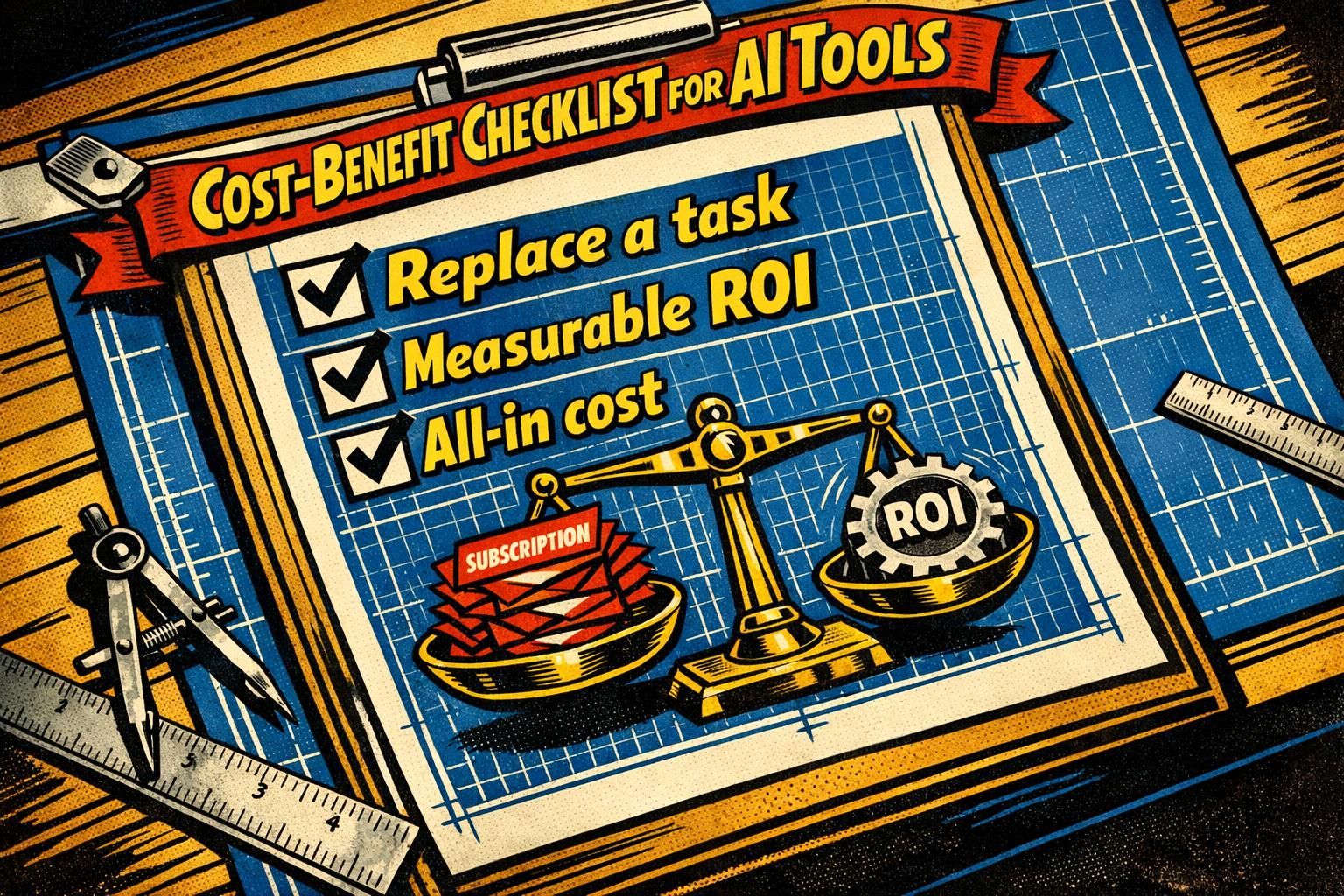
Cost-Benefit Checklist for AI Tools
Most AI tools are a waste of money – unless you know how to pick the right one. Here’s the truth: 70% of AI tools get tossed because they don’t deliver results. It’s not just about the subscription fee; hidden costs like setup, training, and integration can easily triple your expenses. Before you invest, ask yourself one critical question: "What task will this tool replace, and how much time or money will it save?" If you can’t answer that, you probably don’t need it.
Key Takeaways:
- AI tools fail when you skip the basics. Start by identifying a specific problem (e.g., reducing invoice errors or speeding up email replies). Vague goals like "boost productivity" won’t cut it.
- Hidden costs add up fast. A $99/month tool could cost $1,200+ in setup time alone. Factor in training, integration, and maintenance before you commit.
- Set clear success metrics. Track KPIs like hours saved, error rates, or cost reductions. If you don’t see results in 30–60 days, it’s time to pull the plug.
- Test with your actual data. Don’t trust vendor demos – they’re designed to impress. Use your messy data to see if the tool actually works.
- Monitor costs and performance. Tools can underperform over time due to "drift" or unexpected fees. Regular audits can save you thousands.
Bottom line: Don’t fall for flashy marketing. Only invest in AI that replaces a specific task, delivers measurable results, and fits your budget. Anything else is just wasted money.
Define Your AI Implementation Goals
Before diving into demos or comparing prices, take a step back and define the exact problem you’re trying to solve. This isn’t just a box to check – it’s the foundation for success. Think about the tasks that are eating up your team’s time, draining resources, or slowing down operations.
Here’s a reality check: 80% of AI projects fail because teams misunderstand or miscommunicate the problem they’re trying to solve. Even more eye-opening, 74% of companies haven’t seen real value from their AI investments. Why? They skipped this crucial step and bought tools that sounded impressive but didn’t align with their actual needs.
The winning strategy is simple: match the tool’s strengths to your specific challenge. For example, if you’re drowning in spreadsheet analysis, don’t opt for a general-purpose chatbot – choose a tool built for data analysis. Need to automate appointment scheduling? Go for something designed to cut out the back-and-forth, which can slash scheduling time by as much as 80%.
Not sure how to evaluate a tool? Use "The One-Sentence Rule": If you can’t clearly say, “This tool does X, which currently takes Y hours per week,” you’re not ready to commit. As the Ledger Brief Team puts it:
Ready to leave the job you hate and find the fastest path to online wealth? Learn the best asset you have right now to leverage income and build financial run way in my bestseller "Fire Your Boss." Click here to download the book for free.
The single best predictor of whether an AI tool will deliver value is whether you can name the exact task it replaces and how much time that task currently costs you.
Identify Your Business Problems
The first step is to zero in on a specific manual task you want to eliminate or improve. Vague goals like "boost productivity" or "modernize operations" won’t cut it. Instead, be precise: Are you trying to cut invoice processing time? Speed up email responses? Reduce data entry errors?
Focus on tasks that tie directly to revenue, retention, or cost efficiency. Anything else runs the risk of becoming a "productivity toy". For example, AI-powered email response tools can save businesses handling high volumes of inquiries between 10 and 15 hours a week. That’s a measurable, concrete result worth pursuing.
Track how much time your team spends on manual tasks for a week. If customer follow-ups take 12 hours weekly and an AI tool can cut that to 3 hours, you’ve found a real opportunity. But if the tool only shaves off 30 minutes, it might not justify the setup costs and learning curve.
Also, take a hard look at your current tools to avoid overlapping features. Once you’ve nailed down the problem, quantify its impact so you can set clear success benchmarks.
Set Measurable Success Metrics
After identifying the problem, the next step is to define how you’ll measure success. Forget vague aspirations – focus on specific, trackable KPIs from day one.
Link time savings and cost reductions directly to your business goals. Common metrics include time saved per week, cost reductions, and efficiency improvements like fewer errors or faster processing times. For instance, AI-powered invoice processing can reduce accounting time by 30% to 50% for businesses managing over 100 monthly transactions. That’s a metric you can verify within the first billing cycle.
Here’s a quick breakdown of potential metrics:
| Metric Category | Specific KPI Examples | Goal Alignment |
|---|---|---|
| Productivity | Hours saved per week; Tasks completed per day | Cost Efficiency |
| Sales/Marketing | Lead conversion rate; Deals closed; Engagement reach | Revenue Growth |
| Customer Service | Response time; CSAT scores; Resolution rate | Retention |
| Operations | Error rate; Integration uptime; Processing speed | Scalability |
| Human Resources | Employee turnover rate; Overtime pay reduction | Workforce Stability |
Set a 30-60 day window to measure results. If the tool isn’t showing progress within that timeframe, it’s a warning sign. Define your "kill criteria" upfront – specific reasons to stop the project if it doesn’t meet expectations. As AI Primer warns:
If you cannot state your kill criteria in advance, you are not running a pilot; you are running a demonstration.
Lastly, calculate your break-even point. Add up the total first-year cost (subscription, setup, training) and divide it by the monthly savings. This will tell you how many months it’ll take to see a positive ROI. For example, if a tool takes 18 months to break even but you’re locked into a 12-month contract, you’re already losing money.
Calculate Total Implementation Costs
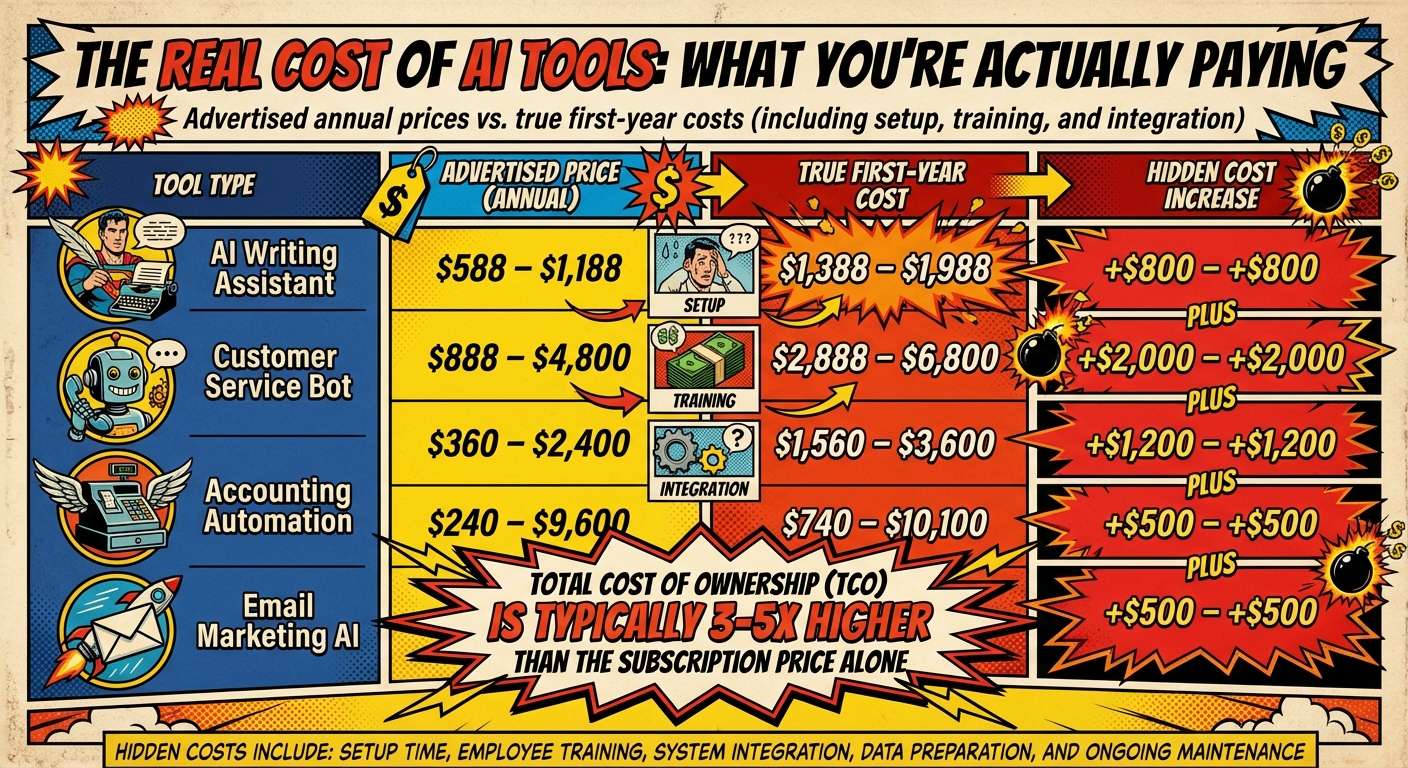
True Cost of AI Tools: Advertised Price vs First-Year Reality
Once you’ve nailed down your goals, it’s time to dive into the real costs. Many CIOs underestimate the actual price tag of AI infrastructure – by as much as 30%.
The Total Cost of Ownership (TCO) for the first year often ends up being 3-5 times higher than the initial subscription or API cost. Take a $20/month subscription, for example. It seems reasonable at first glance, but after factoring in setup, training, integration, and even temporary productivity dips, the total cost can skyrocket. Breaking down these numbers is critical for calculating ROI and choosing the right vendor.
Identify Upfront and Recurring Costs
The starting point is obvious: licensing fees. Most AI tools for individuals hover around $20/month, but team plans quickly climb to $25–$30 per user, often requiring a minimum of two users. What seems like a solo tool can unexpectedly inflate your annual budget.
But licensing is just the tip of the iceberg. Implementation and integration costs can range from 2-5 times the base license fee. For example, integrating AI with your current systems might cost anywhere from $500 to $5,000. If you’re dealing with older systems with limited APIs, those costs can jump by another 30–50%.
Then there’s data preparation, a notorious budget eater. Cleaning, formatting, and curating training data can cost anywhere from $10,000 to over $100,000, often swallowing 10–25% of the total implementation budget. And don’t forget potential overage charges for importing large datasets.
Infrastructure expenses also add up, typically accounting for 20–40% of total AI spending. Running a tool like Stable Diffusion on your own hardware might require a $500+ GPU. Meanwhile, cloud-based systems processing 1,000 documents daily can rack up API costs of $800 to $1,500 per month.
Compliance and security bring their own costs, especially in regulated industries. Initial security assessments and legal reviews for AI systems can cost $5,000–$15,000, while ongoing compliance measures like GDPR adherence may run $5,000 to $25,000 annually.
Recurring costs are often overlooked but just as critical. Maintenance and error correction, for instance, can add up. Fixing 20 AI errors a month at $75/hour costs about $75 monthly. Annual maintenance typically runs 10–20% of the initial build cost. Other hidden costs include API overages, unexpected usage fees (like "fast hour" depletion in image generators), and data export charges, which can tack on an extra 10–20% when switching vendors. Monitoring tools to track accuracy and drift can cost another $50–$200 per month.
Here’s a snapshot of what small businesses might face:
| Tool Type | Advertised Price (Annual) | True First-Year Cost (Inc. Setup/Training) |
|---|---|---|
| AI Writing Assistant | $588 – $1,188 | $1,388 – $1,988 |
| Customer Service Bot | $888 – $4,800 | $2,888 – $6,800 |
| Accounting Automation | $360 – $2,400 | $1,560 – $3,600 |
| Email Marketing AI | $240 – $9,600 | $740 – $10,100 |
Pro tip: Start with monthly plans instead of locking into long-term contracts. AI tools evolve quickly, and what works today might not be the best fit tomorrow. Set usage alerts at 70% and 90% of your plan limits to avoid surprise bills from consumption-based pricing models.
Account for Internal Resource Allocation
Don’t forget the cost of your team’s time – it’s often the most expensive resource in any AI project. As Digital Applied puts it:
Talent represents both the largest budget line and the most significant constraint for most AI initiatives.
Setup time can vary widely. Simple tools might take 2–4 hours to configure, but platform-level solutions could demand 20–40+ hours of staff time. Onboarding and training add another layer, requiring 15–30 hours per department. At $75/hour, training costs alone can run $1,125–$2,250 per team.
Now multiply that by the size of your team. If each user needs 8 hours of training and you’ve got five people, that’s 40 hours of lost productivity before you even start seeing results. Many organizations allocate 15–20% of their AI budget for training and change management, with comprehensive upskilling costing $2,000–$5,000 per employee.
And then there’s the opportunity cost. Redirecting engineers or other staff from their main responsibilities can slow down existing workflows. Data preparation alone can eat up 40–60% of the total project time. Connecting AI systems to your current infrastructure often requires an additional 40–80 hours of development work per major integration. During the initial rollout, it’s not uncommon for processes to temporarily slow down as teams adapt to the new system.
Phil Maher from AIAdvocate sums it up perfectly:
Underinvesting [in training] is the fastest path to a shelfware project.
AI systems also require ongoing maintenance. Models aren’t “set and forget.” Quarterly reviews and testing are essential, as updates from providers like OpenAI or Google can impact performance. Budgeting an extra 15–20% of your API spend for monitoring tools is a smart move.
Lastly, don’t underestimate the value of internal champions – team members dedicated to driving adoption and establishing feedback loops. Without them, adoption rates can plummet, and your ROI might disappear.
Pro tip: Calculate the "Team Multiplier" by multiplying the estimated learning hours by the number of users. If the numbers don’t justify the investment, the tool might not be worth it. Also, remember the 80/20 Rule: if a free tool delivers 80% of the value with just a little extra manual effort, a paid version may not be worth it for infrequent tasks.
Assess Integration and Infrastructure Requirements
Before committing to any AI tool, it’s critical to understand how it will fit into your existing tech stack. Compatibility issues can quickly drain your budget, and the worst part? They often don’t show up until after you’ve signed the contract.
Check Technical Compatibility
Start by evaluating whether the tool can seamlessly connect with your current systems. Look for native integrations with tools like your CRM, communication platforms (e.g., Slack or Teams), and data warehouses. Native connections eliminate the need for costly custom development and reduce the risk of failures. Relying on third-party connectors like Zapier adds extra layers of dependency, which can break during service updates.
Dive into the vendor’s API documentation to ensure it aligns with your data structures. This is key to avoiding the nightmare scenario described by the Ledger Brief Team:
The most expensive scenario [is when] it works for 90% of your data, and you spend ongoing time dealing with the 10% that doesn’t map cleanly.
During the pilot phase, test the tool with your actual company data, not the polished demo sets vendors often use. Real-world data can expose integration issues that won’t show up in a controlled demo environment.
Also, confirm deployment options – whether the tool is on-premise, private cloud, or standard SaaS – and ensure it meets your encryption and compliance needs. If you’re in a regulated industry like healthcare or finance, double-check that it supports requirements like HIPAA or GDPR compliance. Make sure it integrates with your CMS or analytics platforms as well.
Setup time varies widely. Simpler tools, like receipt scanners, might take just 2–4 hours to configure, while more complex platforms could demand 20–40+ hours of staff time. Similarly, straightforward integrations may take only 30 minutes, but custom configurations can require 5–10 hours plus ongoing maintenance.
Once the basics are squared away, think about whether the tool can keep up as your business grows.
Plan for Scalability and Resource Needs
Initial compatibility is just the beginning – you also need to consider how the tool will perform over time as your needs evolve. This step is part of a broader cost analysis to ensure the solution remains effective as you scale. Some tools work perfectly for a small operation but fall apart when faced with larger demands.
Examine the tool’s computational and network requirements. If it’s locally deployed, check whether you’ll need specialized hardware. For cloud-based systems, assess how well API latency and throughput hold up as data volumes increase. Surprisingly, only 15% of organizations are fully prepared for the network demands of AI. Companies with centralized data systems tend to scale AI more effectively than those with fragmented setups.
Collaboration features are another factor. The tool should support version control and simultaneous access to avoid bottlenecks. As Divlytics warns:
A tool that requires constant manual input or supervision may feel helpful today – but becomes a bottleneck tomorrow.
Pricing tiers deserve close scrutiny too. Some tools might seem affordable upfront but become unsustainable as your usage or data needs grow. Make sure the solution allows data export in standard formats like CSV or JSON to avoid being locked into a single vendor.
Lastly, address the issue of model drift – when a tool’s performance declines as real-world data changes. Ask the vendor how they handle updates and retraining to maintain accuracy. If the tool’s performance degrades, it could undermine your return on investment over time.
Quantify Benefits: Direct and Indirect
To truly understand the impact of an AI tool, it’s crucial to evaluate both its visible and less obvious benefits. This means looking at measurable savings and the broader advantages it brings to your operations.
Measure Direct Cost Savings
Start with the most straightforward metric: labor cost reduction. Calculate how much time the tool saves each week, multiply it by your team’s average hourly rate, and then annualize it by multiplying by 52. For instance, if an AI scheduling tool saves 10 hours per week and your average hourly rate is $30, you’re looking at $15,600 in yearly savings.
However, don’t forget about the "rework tax." Studies show that 37-40% of the time saved can be lost correcting low-quality AI output. As the SUCCESS Staff aptly puts it:
If you’re spending as much time checking AI output as doing the work yourself, you’ve automated nothing. You’ve added a step.
Focus on tasks with a proven high return, like automating email responses, scheduling, invoicing, or making money with AI. For solopreneurs, the math can be game-changing: replacing $3,000–$6,000 in labor with a $150–$400 monthly AI subscription can deliver a 10x–20x cost reduction.
Another key area is error reduction. If you’re spending hours fixing mistakes, calculate the cost by multiplying the number of errors per month by the time it takes to resolve each one and your hourly rate. AI bookkeeping tools, for example, can reduce accounting time by 30%-50% while slashing errors, especially for businesses handling 100+ monthly transactions.
Ready to leave the job you hate and find the fastest path to online wealth? Learn the best asset you have right now to leverage income and build financial run way in my bestseller "Fire Your Boss." Click here to download the book for free.
When projecting savings, stay realistic. Vendors often promise "10x" improvements, but it’s safer to assume a 30%-50% efficiency gain to account for the learning curve and integration hurdles. Beyond immediate savings, factor in how these tools streamline operations and improve decision-making.
Evaluate Indirect Benefits
Some benefits, while harder to measure, can be just as impactful. Take 24/7 customer engagement as an example. AI chatbots can capture leads and answer inquiries outside of business hours – opportunities that would otherwise be missed. For a fraction of the cost of part-time human labor ($29–$100 per month compared to $1,800–$2,800), AI receptionists can not only reduce expenses but also improve response times.
Another overlooked advantage is enhanced decision-making. AI-powered natural language search in CRMs can cut data retrieval time by 80%-90%. Instead of spending minutes digging through spreadsheets, you can ask, "Who have I talked to in fintech this month?" and get an answer in seconds. Over time, this speed can lead to faster, more informed decisions that strengthen your competitive edge.
For larger companies, workforce analytics can make a huge difference. Predicting employee turnover or identifying dissatisfaction early can prevent productivity losses. For a median-size S&P 500 company, disengagement and attrition can cost $228 million to $355 million annually. Even a small reduction in these losses can make AI tools worth every penny.
To maximize these benefits, track them systematically. Monitor metrics like customer satisfaction, decision-making speed, and employee engagement before and after implementing AI tools. As SoloStack wisely notes:
The goal isn’t to become a robot… The goal is to stop doing $15/hour work so you can focus on the $150/hour work that only you can do.
Evaluate Vendor Pricing Models and Hidden Costs
When you’re figuring out costs and integration needs, you can’t just stop at the sticker price. What looks like a bargain upfront can balloon into a pricey headache once you dig into the fine print. Breaking down vendor pricing models and spotting hidden fees ensures you’re comparing actual costs – not just the advertised ones.
Understand Common Pricing Models
AI vendors tend to follow one of six pricing structures, each with its own trade-offs:
- Flat-rate subscriptions: These charge a set monthly or yearly fee. For example, individual plans might cost $20/month, while team plans range from $25 to $30 per user. While predictable, some plans come with "soft" usage caps that can limit access to advanced features.
- Usage-based pricing: Costs are tied to usage, like tokens, API calls, or compute hours. OpenAI’s GPT-4, for instance, charges $2.50 for 1 million input tokens and $10 for 1 million output tokens. This model aligns costs with actual usage but can lead to unexpected spikes. Setting spending alerts at 70% and 90% of your monthly budget can help avoid surprises.
- Per-seat pricing: Charges are based on the number of users. While easy to calculate, this model can lead to "shadow seats", where unused licenses pile up. Studies show about 30% of SaaS seats go unused each month.
- Hybrid models: These combine a base subscription fee with overage charges for exceeding usage limits, offering a mix of predictability and flexibility.
- Freemium plans: These offer basic features for free but often impose strict limits to push users toward paid upgrades.
- Credit-based systems: Users buy credits (e.g., "fast GPU hours"), but figuring out the real cost per unit can be tricky.
Here’s a snapshot of 2026 pricing across different AI categories:
| Category | Tool Examples | Individual Price | Team/Enterprise Price |
|---|---|---|---|
| AI Chatbots | ChatGPT, Claude, Gemini | $20/month | $25–$30/user/month |
| AI Coding | GitHub Copilot, Cursor | $10–$20/month | $19–$40/user/month |
| AI Writing | Jasper, Copy.ai | $39–$49/month | $49–$125/user/month |
| AI CRM Add-ons | Salesforce Einstein, HubSpot | N/A (Add-on) | $75–$100/user/month |
An emerging pricing trend to watch is agentic seat pricing, where vendors charge for AI agents or bots instead of human users. This is becoming common in areas like customer support and sales automation and can significantly shift your cost calculations.
Identify Hidden Expenses
The listed price is often just the tip of the iceberg. A surprising 63% of enterprises overspend on AI by at least 30% in their first year, and hidden costs can inflate budgets by 200–300%. Here’s where those extra expenses tend to come from:
- Data preparation: This can increase costs by 50–150% and eat up 20–30% of your project timeline.
- Integration and middleware: Connecting AI tools to systems like CRMs or ERPs often requires custom work or additional middleware, which can cost between $500 and $5,000 upfront.
- Onboarding and training: Teams may need 15–30 hours of training per department. At $75 an hour, this adds $1,125–$2,250 per team.
- Security and compliance reviews: For enterprise deployments, these can cost anywhere from $15,000 to $40,000 per tool.
API-based tools come with their own potential pitfalls:
- Failed request charges: Vendors often bill for failed API requests, and automatic retries can quickly rack up costs.
- Context window waste: Trimming a prompt from 8,000 tokens to 2,000 tokens can save up to 75% on input costs. This is especially important since output tokens are 5–8 times pricier than input tokens.
Before signing on the dotted line, ask vendors critical questions like:
- "Do you use our proprietary prompts or outputs to train your models?" (Ensure this is explicitly prohibited via a ‘no training’ clause).
- "In what format can we export our data if we cancel, and is there a retrieval fee?".
- "What are the ‘fair use’ limits on ‘unlimited’ plans, and what happens to request speeds after hitting caps?".
Lastly, make it a habit to review your AI subscriptions every quarter. Consolidating overlapping tools and cutting unused seats – like replacing multiple $20/month subscriptions with a single team plan – can save you a lot. As the Ledger Brief team wisely puts it:
The most expensive AI tool is one you’re paying for but not using. – Ledger Brief Team
Apply ROI Calculation and Financial Validation
You’ve nailed down costs and uncovered hidden fees. Now comes the real test: proving that the AI tool is worth the investment. Without clear financial metrics, you’re gambling on intuition – and that’s a big reason why 56% of CEOs report no measurable ROI from their AI investments as of 2026.
Use Financial Metrics for Validation
To validate your investment, rely on hard numbers. Let’s break it down:
- Return on Investment (ROI): Use the formula (Annual Net Benefit ÷ Total Cost) × 100. But don’t forget to factor in rework costs. Research shows that 37–40% of time saved by AI is often lost to fixing low-quality output. For instance, if an AI tool saves your team 20 hours a week but requires 8 hours of corrections, your net savings drop to 12 hours.
- Payback Period: Divide the Total Cost by Monthly Net Benefit. Companies leading the pack in 2026 expect to see results within 6–12 months, compared to the industry average of 2–4 years. For example, if you spend $15,000 upfront and $500 monthly on a chatbot that saves $2,500 in labor costs each month, your payback period is 7.5 months.
- Net Present Value (NPV): Calculate this over 24 months by discounting future cash flows to today’s value. Use your company’s Weighted Average Cost of Capital (WACC) plus a 3% risk premium to account for uncertainties tied to AI. A positive NPV indicates the tool generates more value than it costs. For another perspective, the Benefit-Cost Ratio (BCR) can help; an ROI greater than three times the cost is usually a green light.
Here’s how these metrics could look in practice:
| Metric | Base Case | Competition-Adjusted Case |
|---|---|---|
| Monthly Net Profit | $52,250 | $35,530 |
| Payback Period | ~4 months (steady-state) | ~6 months (steady-state) |
| Annual ROI | 300% | 204% |
| 24-Month Net Return | $1,038,000 | $636,720 |
Source: NineTwoThree AI ROI Modeling Framework
To account for the inevitable learning curve, adopt a phased rollout: Build (months 1–4, 0% benefit), Pilot (months 5–6, 25% benefit), Growth (months 7–12, ramping to 100%), and Steady State (months 13–24, 100% benefit).
Perform Sensitivity Analysis
Once you’ve got your baseline metrics, it’s time to test their durability under different conditions. Build scenarios – Conservative, Expected, and Upside – to see how outcomes shift with changing variables.
Consider competitive pressures like 15% market share erosion, 10% price cuts, and a 2-month adoption delay. As the table above illustrates, these factors can reduce annual ROI from 300% to 204%. Still profitable, but it paints a very different picture. As NineTwoThree notes:
"A model that holds up at 45% margin is a stronger business case than one that only works at 65%."
Don’t overlook the "Productive Reallocation Rate" – assume that only 50–70% of recaptured time will be redirected toward high-value activities. For example, if an AI tool frees up 15 hours a week for your sales team, but only 10 hours are spent closing deals, your financial benefit shrinks.
Another key factor is the "Rework Cost" toggle. Adjust your model to reflect AI accuracy levels, such as 85% versus 95% autonomy, and see how that impacts your bottom line. Rising costs from token usage or API calls can also create unexpected inflation, so track these daily. As a rule of thumb: if the break-even point for a non-critical tool stretches beyond 12 months, it’s worth reconsidering.
Finally, build in a 10% contingency for scope creep or hidden dependencies. This isn’t being pessimistic – it’s being realistic. Gartner forecasts that by 2027, 40% of AI projects will fail due to poor measurement of business value. Make sure yours isn’t one of them.
Establish Monitoring and Performance Benchmarks
Once you’ve confirmed the ROI, the next step is keeping an eye on performance to ensure long-term success. After deployment, you need to make sure the AI tool consistently delivers results. AI systems can fail in subtle ways, like quality drift, hallucinations, or unnoticed API updates. That’s why having a solid monitoring plan is non-negotiable. Start by setting clear performance metrics to confirm the tool continues to meet your cost-benefit expectations.
Set Key Performance Benchmarks
Define what success looks like from the start. This means tracking metrics like API latency, throughput, uptime, and model drift. Ask your vendor pointed questions, such as:
How do you monitor model drift? – Mike Gualtieri, Analyst, Forrester
If they can’t give you a clear answer, consider it a warning sign.
Keep an eye on cost-per-request and compare it to your projections. For tools with consumption-based pricing, set alerts to flag any single run that costs more than three times your 7-day rolling average. To monitor quality, track error rates and calculate the monthly cost of errors using this formula: (errors per month) × (average time to fix each error) × (hourly rate). Also, ensure format compliance stays above 95%.
User adoption is another critical benchmark. Studies show that 70–80% of AI project failures happen because people don’t use the tool – not because of technical flaws. Even the best-performing tool won’t add value if your team isn’t on board. With these benchmarks in place, real-time tracking can quickly identify and address any deviations.
Implement Real-Time Monitoring
Set up systems that constantly track both costs and performance. For example, in March 2026, Paxrel’s autonomous newsletter pipeline monitored latency and token costs for each step, with runs taking 45–75 seconds and costing $0.08–$0.14 per run. Their system included a quality gate to ensure articles met a relevance score of at least 0.65 and a word count between 600–900. If these thresholds weren’t met, an alert was triggered via Telegram, and publication was halted.
Incorporate quality gates into your workflows – automated checks that ensure AI outputs meet predefined standards before they’re released. Use a "dead man’s switch" to detect when scheduled tasks fail to start due to server or network issues. Set up multi-channel alerts for critical issues, like API credits dropping below 20%, two consecutive failed runs, or quality gate violations.
Run a 30-day pilot to gather baseline data, then track metrics like spend, time saved, and human-verified quality scores. Conduct quarterly audits of your subscriptions to catch any overlooked costs that could add up significantly. As Paxrel demonstrated, effective monitoring is what separates a reliable autonomous tool from one that constantly needs babysitting.
Conclusion
This checklist helps you cut through the noise and make smarter decisions about AI tools. The real difference between a wise AI investment and a costly mistake lies in understanding the true cost before diving in. That $49/month subscription might seem like a bargain – until you factor in 16 hours of setup time, ongoing maintenance headaches, and constant error fixes that drive up the actual cost.
By following this framework, you can ignore the flashy marketing and focus on what matters: total cost of ownership, ease of integration, hidden fees, performance against real-world benchmarks, and measurable ROI. Always test the tool with your messy, real-world data – not the vendor’s polished demo – and make sure you can clearly define what part of your workflow the tool will replace. If you can’t do that, it’s probably not the right fit for you just yet.
The businesses thriving with AI aren’t the ones chasing every new tool on the market. They’re the ones that regularly audit their subscriptions, cut out tools with overlapping features, and stick to the ones that deliver clear, measurable results. Take a data-driven approach, and you’ll build an AI toolset that simplifies your operations and drives consistent, meaningful ROI.
FAQs
How do I estimate the true first-year cost of an AI tool?
When calculating the first-year cost of an AI tool, it’s about more than just the subscription fee. You need to account for setup, learning, integration, and ongoing maintenance. Start by estimating the time required for setup and learning – this can range from as little as 2 hours to over 40, depending on the tool’s complexity. Multiply that by your hourly rate, then spread that cost over the year.
Don’t forget to factor in maintenance, fixing errors, and potential workflow disruptions. Finally, subtract the time savings you expect the tool to deliver. This approach gives you a more accurate sense of the tool’s overall financial impact.
What KPIs should I track to prove ROI in 30–60 days?
To see a return on investment (ROI) within 30–60 days, focus on tracking key performance indicators (KPIs) like pipeline improvements, higher win rates, and better forecast accuracy. Keep an eye on AI-specific metrics as well, such as lead enrichment and pipeline hygiene. While early signs of ROI can emerge within this timeframe, more concrete results often become noticeable around day 60–90, depending on how far along the implementation is and the quality of your data.
How can I test an AI tool with my real data before buying?
The smartest way to see if an AI tool fits your needs is by asking for a demo that uses your actual data. Make sure the demo lets you upload and process your information so you can evaluate how well it handles compatibility, performance, and security. This approach ensures the tool aligns with your expectations and meets your standards before you invest in it.
Related Blog Posts
- How to Validate Business Ideas Before Quitting Your Job
- How to Build an AI Decision Framework
- AI Personalization for Subscription Models
- How AI Simplifies Niche Validation
Ready to leave the job you hate and find the fastest path to online wealth? Learn the best asset you have right now to leverage income and build financial run way in my bestseller "Fire Your Boss." Click here to download the book for free.