
ChatGPT vs. Claude: Best for Community Content
ChatGPT and Claude are two leading AI tools for creating community content, each excelling in different areas. Here’s the quick takeaway:
- ChatGPT is fast and versatile, perfect for short-form content like social posts, email hooks, and brainstorming. It integrates tools like DALL-E for visuals and supports multitasking with voice input and web research. However, it may require more editing for tone and accuracy.
- Claude focuses on delivering polished, human-like long-form content, such as newsletters and guides. Its massive 1M-token context window allows for deep analysis and consistency, but it’s slower and lacks built-in tools for image or video creation.
Quick Comparison
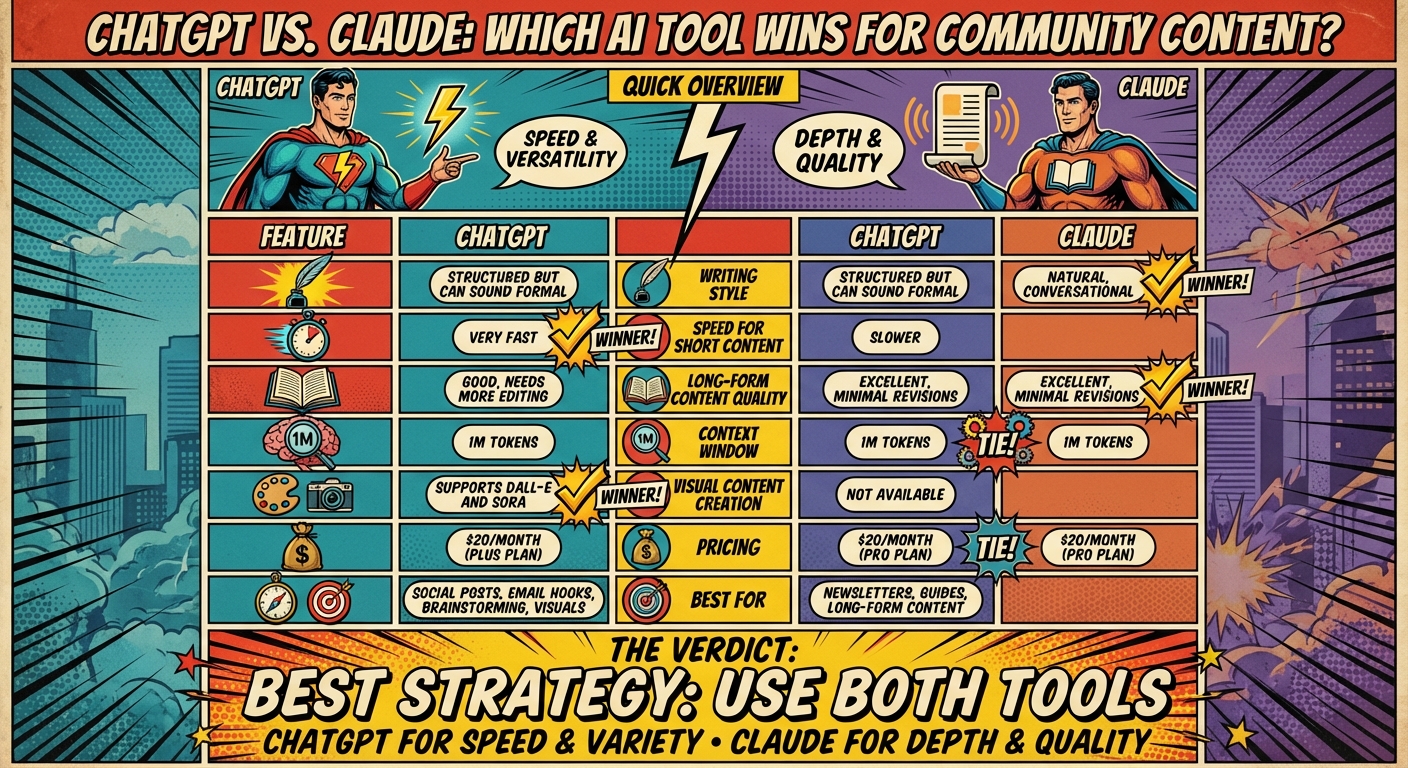
| Feature | ChatGPT (GPT-5.4) | Claude (Sonnet 4.6) | Winner |
|---|---|---|---|
| Writing Style | Structured but can sound formal | Natural, conversational | Claude |
| Speed for Short Content | Very fast | Slower | ChatGPT |
| Long-Form Content Quality | Good, needs more editing | Excellent, minimal revisions | Claude |
| Context Window | 1M tokens | 1M tokens | Tie |
| Visual Content Creation | Supports DALL-E and Sora | Not available | ChatGPT |
| Pricing | $20/month (Plus plan) | $20/month (Pro plan) | Tie |
Bottom line: Use ChatGPT for speed and variety, and Claude for depth and quality. Combining both tools can help you create engaging, well-rounded community content.
ChatGPT vs Claude Feature Comparison for Community Content Creation
ChatGPT for Community Content
ChatGPT tackles the fast-paced demands of creating community content with impressive speed and adaptability. Imagine having over 20 options for hooks, headlines, and social captions in just seconds – perfect for keeping your content calendar full across multiple platforms. It takes a single idea and reshapes it to fit different formats, like a LinkedIn post, an Instagram caption, or even an email subject line. This flexibility makes it a go-to tool for managing content in diverse community spaces.
But it’s not just about speed. ChatGPT’s advanced multimodal features take content creation to another level. With DALL-E 3 built in, you can whip up social graphics or infographics without leaving the platform. Want to brainstorm while multitasking? Voice Mode lets you do it hands-free. Plus, its Deep Research feature provides clickable citations and verified sources, which can help you earn your audience’s trust. Custom GPTs allow you to embed your brand guidelines directly, ensuring your content stays consistent – even when multiple people are involved.
What ChatGPT Does Well
For community managers, these tools mean one thing: tailored, engaging content that fits every platform. ChatGPT shines when it comes to quick idea generation and crafting content that matches the tone of different social environments. Need a catchy TikTok hook? A polished LinkedIn post? Or maybe carousel copy for Instagram? ChatGPT has you covered. It’s also a pro at using direct-response frameworks like Pain-Agitate-Solution (PAS) and Before-After-Bridge (BAB), both of which are great for sparking engagement.
Ready to leave the job you hate and find the fastest path to online wealth? Learn the best asset you have right now to leverage income and build financial run way in my bestseller "Fire Your Boss." Click here to download the book for free.
"ChatGPT – which you can train on your specific needs – excels at rapid ideation, email copy, and social content." – Justina Thompson, Writer, HubSpot
Beyond content creation, ChatGPT’s Agent Mode streamlines community management tasks by connecting with tools like Slack, Google Drive, and Jira. It can identify spam, summarize long discussion threads, and even assist in onboarding new members. With over 400 million weekly active users and a 4.7/5 rating on G2, it’s clear that professionals trust ChatGPT to handle their workflows.
Where ChatGPT Falls Short
That said, ChatGPT isn’t without its limitations. Its 128,000-token context window can make it tricky to analyze long community discussions or full-length documents. When tasked with creating long-form, structured content, it sometimes defaults to repetitive lists unless you give it very specific instructions.
Then there are the usage limits. Free users can only send 10 messages every 5 hours, while Plus subscribers ($20/month) get 160 messages every 3 hours. This can disrupt workflows, especially during high-demand periods. Another issue is tone – ChatGPT often leans into overly formal, corporate language with phrases like "in today’s ever-changing landscape", which might require extra editing to feel more natural. Accuracy can also be a problem, as the tool sometimes fabricates citations or confidently delivers incorrect information. For community-facing content, human fact-checking remains essential.
Claude for Community Content
Claude takes a unique approach to community content, prioritizing quality over speed. Instead of churning out multiple drafts rapidly, it focuses on creating one well-crafted piece that feels genuinely human. With a massive 200,000-token window (around 500 pages), Claude can incorporate extensive resources like brand books, newsletters, and community transcripts into its process. This means it can draw from your entire content library to ensure every post, email, or article aligns perfectly with your brand’s voice. This depth-first approach also supports features designed for refining content in real time.
Claude’s editing tools stand out, particularly its Artifacts UI, which offers a side-by-side window for editing content without cluttering your workspace. Its Claude Projects feature allows you to upload over 50 source files – think style guides, past posts, or frameworks – to give the AI comprehensive context. Another highlight is Custom Styles, which lets you switch between pre-set tones, such as a lively voice for Instagram or a reflective tone for long-form essays, without having to rewrite prompts.
What Claude Does Well
For creators focused on community content, Claude’s features bring a polished, human-like flair to long-form writing. It shines in projects that require emotional depth and consistency across extensive pieces. Many professional copywriters commend its ability to evoke emotion while maintaining a cohesive brand voice over thousands of words. Using contractions, varied sentence structures, and a conversational tone, Claude’s output feels more natural and less robotic compared to other AI tools. In fact, in AI detection tests, only 34% of Claude’s technical articles were flagged as AI-written, compared to 89% for ChatGPT.
"Claude writes more like… a thoughtful person. Contractions. Varied sentence structure. Opinions. It’s not perfect, but the editing lift is noticeably lower." – AI Tool Briefing Team
Claude also stands out for its honesty. It openly admits when it lacks information or when a request is unclear, helping to minimize errors caused by overconfident guesses. For community managers tackling complex topics like technical whitepapers or research-heavy content, Claude’s ability to process and analyze multiple PDFs at once is a game-changer. Its advanced memory system also ensures a balance between permanent brand identity ("About Me") and recent projects ("Top of Mind"), rebuilding nightly to stay up-to-date without compromising your core voice.
Where Claude Falls Short
However, Claude’s slower output can be a drawback for users who need quick-turnaround content like social media captions or multiple variations on short-form posts. While ChatGPT can generate 20 hooks in seconds, Claude takes its time to deliver a single polished draft, making it less ideal for high-volume content calendars.
Another limitation is its lack of built-in image and video generation. Unlike tools such as DALL-E or Sora, Claude doesn’t natively support visual content creation, so you’ll need additional tools if your strategy relies heavily on visuals. The free tier also comes with strict rate limits, which can disrupt workflows during busy periods. At $20/month for the Pro plan (or $17/month billed annually), Claude’s pricing matches ChatGPT, but you’re trading multimodal features for a focus on writing quality. These differences highlight Claude’s niche as a tool for creators who value depth and refinement over speed and versatility.
Feature-by-Feature Comparison
Choosing between ChatGPT and Claude for community content often depends on the type of content you’re producing and how quickly you need it. These tools excel in different areas, particularly when it comes to writing style, speed, and collaborative creativity.
ChatGPT is the go-to for short-form content that needs to be churned out fast. Need 20 social media hooks or catchy headlines in under a minute? ChatGPT delivers. On the other hand, Claude takes a more deliberate and thoughtful approach, making it perfect for long-form content where maintaining a smooth narrative flow is essential. While ChatGPT shines at generating quick drafts, Claude focuses on delivering polished, human-like narratives – a distinction that becomes clear in the breakdown below.
"Claude is an absolute brilliant writer. But you tried to make a five-course meal when I needed a damn appetizer." – Timo Mason, Substack Creator
Comparison Table
| Feature | ChatGPT (GPT-5.4) | Claude (Sonnet 4.6) | Winner |
|---|---|---|---|
| Natural Writing Style | Improved but can feel generic or bulleted | Human-like flow with rhythm and personality | Claude |
| Speed for Short Posts | Fast and skimmable | Slower; tends to be more narrative | ChatGPT |
| Long-form Quality | Good but may require additional editing | Excellent; maintains consistency and nuance | Claude |
| Context Window | Up to 1M tokens | Up to 1M tokens | Tie |
| Creative Iteration | Task-completer; follows prompts directly | Acts as a strategic partner offering collaborative options | Claude |
| Hooks & Emails | Best for attention-grabbing hooks | Best for professional, empathetic emails | Split |
This table highlights each tool’s strengths. Many community managers find success using a hybrid approach: ChatGPT for brainstorming the perfect topic and short-form strategy, and Claude for crafting polished, in-depth content. By combining the speed of one with the depth of the other, you can maximize efficiency without sacrificing quality.
Pros and Cons Overview
When deciding between ChatGPT and Claude for creating community content, it’s all about understanding their strengths and weaknesses. ChatGPT stands out for its speed and adaptability – perfect for mastering ChatGPT prompts for quick social media posts, generating visuals with DALL-E 3, and even performing live web research. On the flip side, Claude focuses on delivering more detailed, human-like responses, offering a massive 1M-token context window for comprehensive tasks.
That said, ChatGPT has its drawbacks. Its tone can come off as robotic or overly formal, which might not resonate well with community audiences. It also has a tendency to produce errors, requiring extra fact-checking. Claude, while great for nuanced and authentic writing, lacks built-in tools for image or video creation, has limited web browsing capabilities, and allows fewer interactions within a given time frame.
"ChatGPT will confidently tell you something that’s completely wrong… I still catch it making up facts, inventing citations, and stating opinions as facts way more often than Claude." – AI Tool Briefing Team
Privacy is another key consideration. By default, ChatGPT uses your conversation data for model improvement (though you can opt out), while Claude doesn’t train on user data and deletes conversations after 30 days. For community managers handling sensitive topics, this difference could be a deciding factor. Keeping these trade-offs in mind is crucial for creating content that genuinely connects with your audience.
Pros and Cons Table
| Tool | Pros | Cons |
|---|---|---|
| ChatGPT | • Quick responses for fast-paced content • Built-in image (DALL-E 3) and video (Sora) generation • Web search for up-to-date trends • Custom GPTs for specific tasks • ~80 messages per 3 hours (Plus plan) |
• Can feel robotic or overly formal • Prone to inaccuracies • Limited to a 128,000-token context window • Uses chat data for training (opt-out available) • Strict content moderation filters |
| Claude | • Produces natural, conversational writing • Huge 1M-token context window (around 750,000 words) • Strong reasoning skills and admits uncertainty • Does not train on user data • Includes "Artifacts" for document comparisons |
• No image or video generation tools • Lacks web browsing or real-time research • Limited to ~45 messages every 5 hours • Shorter conversation history • Slower with complex prompts |
How to Use These Tools with Serve No Master
Running a location-independent business requires you to be both quick and effective – qualities that ChatGPT and Claude bring to the table in the Serve No Master framework. The trick is knowing when to use each tool. Think of it like a two-part system: ChatGPT takes care of the fast, attention-grabbing tasks (like social posts, hooks, and visuals), while Claude handles the deeper, more thoughtful work (like newsletters, guides, and community responses). By aligning with the Serve No Master community-focused content strategy, you can use these tools to streamline your workflow and create impactful content. Let’s break down how to make the most of each tool.
ChatGPT Applications for Serve No Master
When it comes to daily content creation or product launches, ChatGPT is your go-to tool. Need email subject lines? It can whip up 20+ options in seconds, exploring angles like urgency or curiosity. Thanks to its DALL-E integration, you can also generate social media graphics or product mockups without needing a designer. Plus, with custom GPTs, you can create specialized assistants trained on your business, like an FAQ generator or a sales script writer.
For entrepreneurs managing multiple income streams, ChatGPT is a time-saver. Imagine batching a week’s worth of Instagram captions or Substack notes in under 10 minutes. This keeps your community engaged and ensures you’re consistently delivering value.
While ChatGPT focuses on speed and volume, Claude is your partner for depth and connection.
Claude Applications for Serve No Master
Claude steps in when it’s time to build deeper connections and establish authority. Its natural, conversational tone makes it perfect for creating newsletters and blog posts that resonate with professionals over 40 – people who value honest, meaningful content over flashy marketing.
You can upload your brand voice guide (up to 150,000 words) into a Claude Project to ensure your tone stays consistent. It can even analyze your most successful posts to help you replicate what’s worked in the past. Need to understand your audience better? Ask Claude to adopt the perspective of a community member, helping you identify challenges and craft content that truly speaks to their needs.
"Claude handles all my long-form content… ChatGPT handles all my short-form content" – Timo Mason
Which Tool Wins for Community Content
Each tool shines in its own way. If you’re creating long-form newsletters, ebooks, or community guides that demand depth and a conversational tone, Claude is the tool to lean on. Its large context window helps maintain a consistent brand voice, and its writing feels polished enough to publish with little tweaking. As Justina Thompson from HubSpot says:
"If you prioritize quality and brand consistency, Claude wins".
On the other hand, for quick-turnaround projects and visually engaging formats, ChatGPT takes the lead. It’s faster, can perform real-time web searches, and integrates DALL-E for generating images. For entrepreneurs juggling multiple ventures, its multimodal capabilities make it a go-to for diverse, fast-paced content like repurposing podcast episodes into social media posts or email hooks.
The best strategy? Use both. ChatGPT is ideal for brainstorming and creating short-form content, while Claude excels at crafting the in-depth materials your community values. Content creator Timo Mason demonstrated this perfectly – he used ChatGPT to craft viral threads that earned 14 million views on X (formerly Twitter) and then turned to Claude for Substack articles, noting how Claude’s output required much less editing.
FAQs
When should I use ChatGPT vs. Claude for community content?
When it comes to picking the right tool for the job, ChatGPT is your go-to for quick, dynamic responses and engaging conversations. It shines in fast-paced scenarios where variety and speed are key, making it perfect for handling broad community interactions efficiently.
On the other hand, Claude is built for depth and precision. It’s your best bet for crafting long-form content, conducting detailed analyses, and ensuring consistency in more complex or extended tasks. Claude thrives when you need thoughtful, in-depth content that keeps your audience engaged over time.
In short, use ChatGPT when speed and variety matter most, and turn to Claude when depth and thoroughness are the priority.
How can I use both tools together without doubling my workload?
To get the most out of ChatGPT and Claude, it’s all about playing to their strengths. Set up a workflow where each tool handles what it does best. For example, let Claude tackle tasks that require deep reasoning, analyzing lengthy contexts, or handling more complex, critical work. Meanwhile, use ChatGPT for things like quick content creation, coding assistance, or answering straightforward questions.
You can make this process even smoother by automating prompts to send the right tasks to the right tool. This cuts down on manual effort, avoids unnecessary overlap, and keeps your productivity on point.
What’s the safest way to avoid AI mistakes in community-facing posts?
When creating community-facing posts with AI, it’s crucial to prioritize accuracy and integrity. Always run thorough testing and monitoring before publishing any content. Fact-check every detail to catch inaccuracies or biases that might slip through. Regular oversight isn’t just a good practice – it’s essential to ensure your posts stay accurate, ethical, and aligned with community values. By understanding the risks AI can pose, like spreading misinformation or reinforcing biases, you can take proactive steps to keep your content trustworthy and in line with your audience’s expectations.
Related Blog Posts
- How Do I Create Passive Income Streams? 8 Answers
- AI Tools for Personal Branding and Networking
- ChatGPT vs. Claude: Blog Formatting Comparison
- Ultimate Guide to AI Voiceovers for Video Creators
Ready to leave the job you hate and find the fastest path to online wealth? Learn the best asset you have right now to leverage income and build financial run way in my bestseller "Fire Your Boss." Click here to download the book for free.