
Ultimate Guide to AI-Powered Proposal Writing
AI is transforming proposal writing by cutting down the time from 8–12 hours to just 20–40 minutes. Here’s the deal: 71% of buyers choose the first relevant proposal they see, and AI helps you deliver faster without sacrificing quality. It drafts structured content tailored to client needs, so you can focus on refining and personalizing.
Key insights:
- Efficiency boost: Teams using AI report a 60%–80% increase in response speed.
- Real-world examples: Microsoft reduced draft time by 93%; Front cut security questionnaire time by 83%.
- Human input matters: AI handles 70% of the work, but strategic thinking and personalization are still on you.
AI tools like Bidara, Jasper, and Loopio can generate drafts, manage workflows, and even create interactive designs. The secret? Clear instructions, centralized content libraries, and robust review processes. Start small, measure results, and refine your approach to stay ahead.
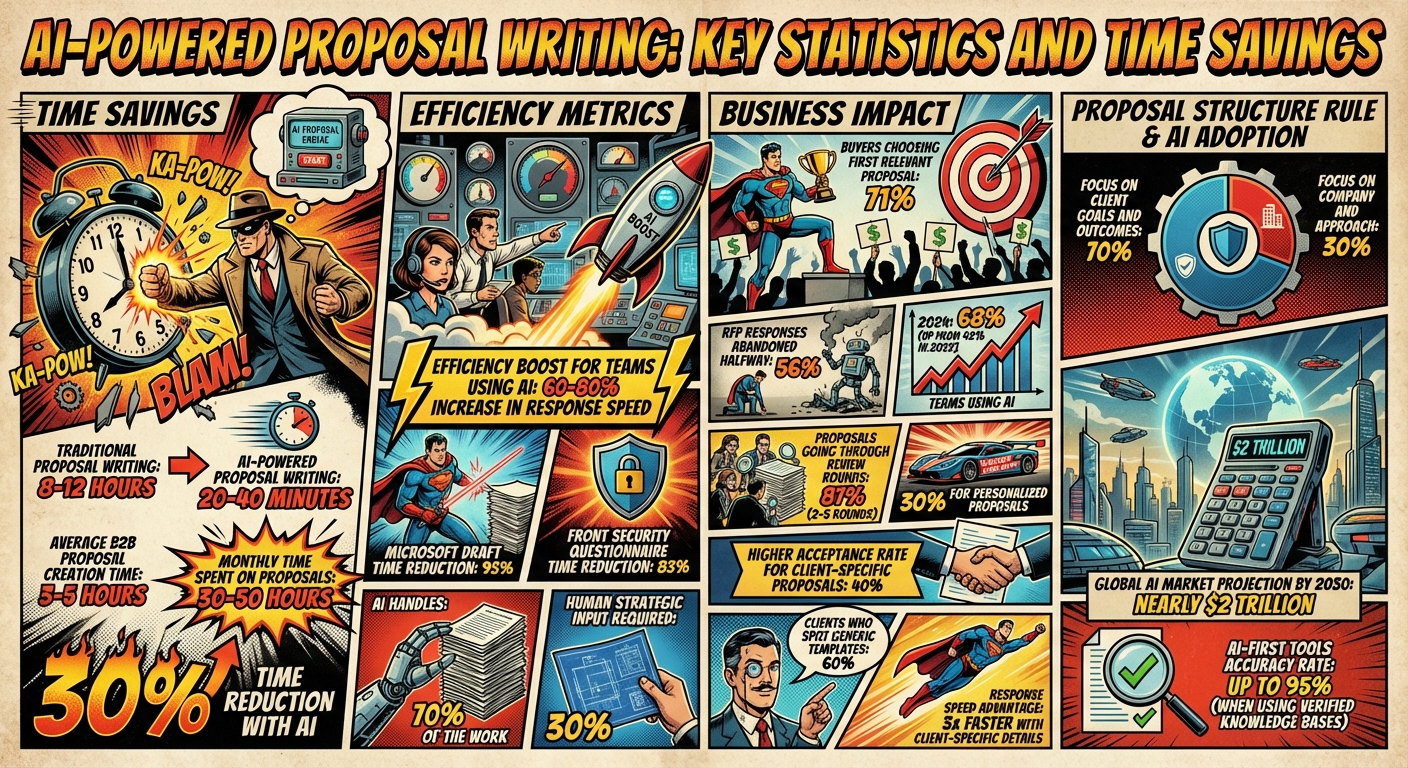
AI-Powered Proposal Writing: Key Statistics and Time Savings
Core Components of a Winning Proposal
AI can help streamline the proposal process, but the backbone of a successful proposal is still its structure. A well-crafted proposal follows a logical flow, giving decision-makers the exact information they need in a clear, organized way.
Start with a cover page and table of contents to make navigation easy for busy readers. Sections like pricing and timelines should be simple to locate. Next comes the executive summary – arguably the most important part of the proposal. This section focuses entirely on the client’s problem and how your solution addresses it, leaving out unnecessary details about your company’s history. It’s all about answering one key question: “Why should I keep reading?”
After grabbing their attention, demonstrate a solid understanding of the client’s needs. This means addressing their specific challenges, industry trends, and competitive pressures. From there, outline your proposed methodology, breaking the project into clear phases with deliverables and any client requirements, such as data access or involvement from stakeholders.
Ready to leave the job you hate and find the fastest path to online wealth? Learn the best asset you have right now to leverage income and build financial run way in my bestseller "Fire Your Boss." Click here to download the book for free.
When it comes to the timeline and milestones, avoid vague estimates. Use specific calendar dates to build trust. Similarly, the pricing section should be transparent and detailed. Present costs in a table, breaking them down item by item, and include payment terms like deposits or milestone-based payments. For added clarity, avoid round numbers (e.g., $10,000) and instead provide precise breakdowns.
The expected outcomes and ROI section is where you justify the investment. Replace generic promises with measurable results, such as an 80% reduction in manual processing time, saving approximately 15 hours per week. Reinforce this with social proof – case studies, testimonials, or team credentials that show your credibility.
Wrap up with terms and conditions that cover key legalities like intellectual property, confidentiality, and cancellation policies. Finish strong with a clear call to action that removes any friction for the client, whether it’s a scheduling link or a request for a signature. Stick to the 70/30 rule: focus 70% of the content on the client’s goals and outcomes, and only 30% on your company and approach.
The next step is breaking down each of these components to show how they convey value clearly and effectively.
Key Sections of a Professional Proposal
Each section in a proposal has a job to do. The executive summary grabs attention by highlighting the client’s problem and the benefits of your solution. The methodology section reassures the client that you know exactly how to tackle their challenges, outlining each phase of the project in detail, including deliverables and client dependencies.
A detailed timeline is essential for managing expectations. AI can help here by generating accurate timelines with start and end dates, phase durations, and milestones that align with the client’s schedule. For the pricing section, transparency is key. Use tables to itemize costs, specify payment terms, and clarify what’s included or excluded – this avoids misunderstandings later.
The ROI and outcomes section should focus on measurable results. For example, showing an 80% reduction in manual processing time, which could save the client 15 hours weekly, is far more compelling than vague claims. Pair this with social proof, such as testimonials or case studies from similar industries, to build trust.
Don’t forget to include terms and conditions that cover important details like intellectual property and confidentiality. Finally, your call to action should guide the client on what to do next, whether it’s signing the proposal or scheduling a kickoff meeting.
| Section | Purpose | Key Elements |
|---|---|---|
| Executive Summary | Hook stakeholders, highlight benefits | Problem statement, high-level solution, key benefits |
| Methodology | Prove expertise and approach | Phases, activities, deliverables, client dependencies |
| Timeline | Build trust and set clear expectations | Start/end dates, phase durations, milestones |
| Pricing | Define the financial investment clearly | Itemized costs, payment schedule, inclusions/exclusions |
| ROI/Outcomes | Justify the investment | Quantified metrics (e.g., "80% reduction in manual processing time") |
| Social Proof | Build credibility and trust | Case studies, testimonials, team bios, logos |
Tailoring Proposals to Your Audience
Even with a strong framework, tailoring your proposal to the client’s needs is what sets it apart. A proposal that resonates with a tech startup won’t work for a government agency. You need to adjust the tone, structure, and content to meet their expectations. Start by researching their specific challenges: What have they tried before? Who’s the decision-maker? What does success look like for them in six months?
For government proposals, use formal language and include compliance-heavy details in a lengthy document (30+ pages). Enterprise clients prefer professional, strategic content that addresses ROI across multiple departments, typically in 15–30 pages. On the other hand, tech startups often appreciate a conversational, concise approach that highlights speed and innovation in just 5–10 pages. Financial services require a more conservative tone, with a focus on risk mitigation and security.
Use the client’s own language. If they call their project a "digital transformation initiative", stick to that term instead of introducing your own. When including case studies, choose examples that closely align with their industry or project type – generic success stories won’t cut it.
Proposal length should match the project size. For smaller projects under $5,000, a one-page proposal might be enough. Standard B2B services usually require 5–10 pages, while government or enterprise RFPs may need 15–30+ pages. In the project background section, use the client’s own words from their RFP to show you understand their goals. If your audience isn’t technical, simplify complex jargon into clear language that focuses on value.
Tailoring your proposal can have a big impact. Proposals with client-specific details get responses three times faster and have a 40% higher acceptance rate. On the flip side, about 60% of clients can spot generic, templated proposals right away. Customizing your proposal isn’t just extra effort – it’s what separates a winning bid from wasted time. With this foundation, the next step is leveraging AI tools to speed up the process while maintaining a personal touch.
Using AI Tools for Proposal Creation
AI tools have become a game-changer for proposal teams. By 2024, 68% of teams are using AI in some form, a significant jump from 42% in 2023. And it’s clear why: creating a B2B proposal from scratch takes 3 to 5 hours, which can total 30–50 hours a month on documents that might not even secure a deal. Even more alarming, 56% of RFP responses are abandoned halfway through because teams simply run out of time. The good news? AI can cut proposal writing time by as much as 30%.
The key is to figure out where your team struggles most. Some tools are designed for rapid content generation, while others focus on managing the complexity of RFP workflows or creating visually impactful presentations. Platforms like Bidara and Inventive AI are built with AI at their core, allowing them to learn from your existing documents and generate content almost immediately – no lengthy setup required. On the other hand, Loopio and Responsive are older platforms that added AI later, often requiring you to build a content library before they’re fully functional. For simpler proposals, tools like Jasper (starting at $49/month) or Copy.ai excel at creating brand-aligned copy. But if you’re managing a high volume of RFPs, options like Loopio ($1,200/month with an annual commitment) or Bidara ($299/month billed annually) provide centralized libraries and collaboration features. Need something visually striking? Alai specializes in pitch decks, while tools like Qwilr and Storydoc transform proposals into interactive web-based formats.
Before choosing a tool, pinpoint where your team is hitting roadblocks. If content creation is the issue, go for tools with strong generative AI capabilities. If your challenges lie in tracking approvals or handling e-signatures, platforms like PandaDoc (starting at $19/user/month) or AiDocX (free tier available, Pro at $12/month) streamline the entire document lifecycle. Be mindful of security, too – steer clear of free AI models like ChatGPT for sensitive client data, as they may use your information for training. Instead, prioritize enterprise-grade tools with SOC 2 compliance.
Selecting the Right AI Tools
Not all AI tools are built the same, and the wrong choice could end up wasting more time than it saves. Start by determining if you need discriminative AI (which organizes and retrieves relevant information from your data) or generative AI (which drafts content and suggests phrasing). Most tools blend the two, but understanding this distinction helps you evaluate their strengths.
Functionality matters more than brand recognition. For marketing-focused proposals, Jasper and Copy.ai are great for crafting persuasive, brand-consistent language. For handling large-scale RFPs, tools like Loopio, Bidara, and Responsive excel at managing centralized libraries and team collaboration. If visual appeal is a priority, Alai, Qwilr, and Storydoc deliver sleek, interactive designs. For end-to-end management, including contracts and e-signatures, platforms like PandaDoc and AiDocX cover the entire workflow. And if you need automation beyond proposal creation, tools like Lindy and GetAccept can handle CRM updates and automated follow-ups.
"AI-first tools (like Bidara) were built around AI from day one – they learn from your existing documents and start generating immediately." – Alexander Georges, Founder & CEO, Bidara
One exciting development is agentic AI, which connects to platforms like Google Drive, SharePoint, and Notion to identify inconsistencies across your documents. This is especially helpful for large teams where outdated pricing or product names might slip through the cracks. Another feature to look for is CRM integration – top tools now sync with Salesforce and HubSpot to auto-fill proposals with deal data, cutting out tedious manual work.
Before committing to a tool, evaluate your workflow. If formatting takes up most of your time, prioritize tools with easy Word/PDF export options. For compliance-heavy industries, look for tools with built-in compliance checks. Solo users or small teams may find general-purpose options like Claude or Jasper sufficient. But if you’re juggling dozens of RFPs each month, a specialized AI platform with collaboration features is worth the investment.
| Tool Category | Top Examples | Primary Functionality |
|---|---|---|
| AI-First RFP | Bidara, Inventive AI | Generates drafts instantly without library setup |
| Legacy RFP | Loopio, Responsive | Library management and team collaboration for enterprise |
| Sales Design | Alai, Qwilr, Storydoc | Visual impact, interactive decks, web-based UX |
| General Writing | Jasper, Copy.ai, Claude | High-quality copy and brand voice training |
| Workflow/E-Sign | PandaDoc, AiDocX | End-to-end document lifecycle from draft to signature |
The right tool is just the first step – how you use it matters just as much.
Writing Effective AI Prompts
A well-crafted AI prompt can make or break your proposal. Vague instructions lead to generic drafts, while detailed prompts result in tailored, persuasive proposals. Think of your prompt as a creative brief: the more context you provide, the better the output.
Start by setting the context: describe the client, their challenges, and the proposal’s objective. For instance: "This proposal is for a mid-sized healthcare provider (500 employees) aiming to cut manual data entry by 80% in six months. The CFO, the decision-maker, prioritizes ROI and compliance." Next, assign a role to the AI, such as "Senior Sales Professional" for persuasive language or "Tender Writer" for compliance-focused content. For complex proposals, use dual roles – one for creativity, another for technical accuracy. Specify the style (e.g., "professional but approachable") and format (e.g., "bullet points, no section over 150 words"). Use negative constraints to avoid clichés: "No buzzwords like ‘synergy’ or ‘cutting-edge.’ Use active voice only".
Take it further with a 3-layer personalization approach. Layer 1 focuses on client context, incorporating industry-specific pain points and insights from discovery calls. Layer 2 ensures tonality matching, aligning with the RFP’s level of formality – formal for government bids, conversational for startups. Layer 3 adds proof points, directing the AI to include specific metrics or certifications like SOC 2 compliance.
"Prompting is simply about giving instructions to AI… The clearer the brief, the better the output." – Gabriëlle de Sain, Tips & Tricks
Before diving into a full draft, use AI to summarize lengthy RFPs to identify key requirements and potential issues. Then, provide the AI with a client brief that includes their goals, preferred terminology, and decision-maker priorities. This ensures the AI generates relevant, focused content instead of generic filler.
Remember, prompting is an iterative process. If the first draft misses the mark, refine your instructions: "Make the executive summary more specific by highlighting the client’s goal of reducing processing time by 15 hours per week." Or ask the AI to "improve this prompt for better results". Always apply human edits to AI-generated drafts to ensure the final product feels polished and authentic.
Using AI for Editing and Refinement
Even the most advanced AI tools need human oversight. Review drafts for clarity, consistency, and alignment with your brand’s voice to ensure the final proposal meets your standards.
Ensuring Quality and Compliance in AI-Generated Proposals
AI can churn out proposals in record time, but here’s the catch: 87% of proposals still go through two to five rounds of review before they’re ready to send off to clients. Think of AI as your co-pilot – it drafts, but your team needs to verify and refine. Without a solid review process, you risk sending out proposals riddled with errors, which can quickly derail your chances of closing the deal.
The first step? Build a "single source of truth." This is a centralized library that holds approved boilerplate content, security language, product specs, and brand voice guidelines. It ensures the AI pulls from reliable, pre-approved data instead of making things up. Configure your AI to pull directly from this library before drafting anything. This helps avoid "hallucinations" (AI-generated inaccuracies) and ensures every claim has a verifiable source.
"The fastest way to ruin trust in an RFP AI agent is to feed it messy content with unclear ownership. If the agent doesn’t know what’s approved, current, and defensible, it will confidently produce liabilities." – Ameya Deshmukh, EverWorker
Once the draft is ready, put it through a multi-step review process. Subject Matter Experts (SMEs) handle technical accuracy, Proposal Managers focus on brand voice and personalization, and Legal or Compliance teams ensure the proposal meets RFP requirements. To save time, use review by exception – let the AI flag problematic sections (like gaps, contradictions, or unverified claims) and route only those parts to the appropriate experts.
Another must-have: require the AI to cite its sources for every claim. This makes it easy for reviewers to verify information without wasting time digging through files. Before sending the proposal, do a final manual check for placeholder text (like "[Client Name]" or "[Insert Pricing]"), confirm the client’s name is spelled correctly, and ensure pricing tables and timelines are accurate. These small details can make or break your credibility.
By combining AI’s speed with a structured review process, you can ensure your proposals are both fast and trustworthy. Here’s how to set up that process.
Setting Up a Review and Approval Process
Define clear roles and responsibilities at each stage of the review. Assign specific tasks to team members: one person handles technical accuracy, another checks for brand alignment, and a third ensures compliance. To make things easier for SMEs, give them targeted prompts instead of vague review requests. For example, ask, "Is this integration generally available?" or "Can we meet this SLA?". This focused approach saves time and avoids confusion.
For critical proposals, enforce mandatory citations so that every claim can be traced back to its source. Tools like Inventive AI claim up to 95% accuracy when pulling from verified knowledge bases, but human oversight is still essential. Configure your AI with an "ask, don’t assume" rule – if it can’t find verified information, it should flag the section for expert input instead of making something up. This prevents the AI from confidently generating false claims that could harm your reputation. Keep audit trails to track who approved what, when, and which sources were used. This adds accountability and creates a defensible record of your work.
| Review Stage | Responsible Party | Focus Area |
|---|---|---|
| Technical Verification | Subject Matter Expert (SME) | Verify technical accuracy |
| Strategic Alignment | Proposal Manager | Check brand voice and personalization |
| Compliance Check | Legal/Compliance Team | Ensure RFP adherence and legal terms |
| Final Polish | Editor/Writer | Review grammar, formatting, and placeholders |
With a clear internal process, you’re better equipped to tackle external RFP requirements.
Meeting RFP Requirements
RFPs often come with a laundry list of requirements – specific formatting rules, submission deadlines, required sections, and even preferred terminology. Missing just one can disqualify your proposal. AI tools can help by creating a requirements matrix that tracks all the necessary details, from questions to deadlines, ensuring nothing slips through the cracks.
Use AI to categorize RFP questions into groups like legal, security, pricing, and product. Route each category to the right department only if there’s no pre-approved answer in your knowledge base. This keeps the process efficient and ensures the right experts handle the right sections. For industries with heavy compliance needs, configure your AI to flag sections requiring legal review or certifications like SOC 2.
AI can also summarize RFPs to highlight key requirements before drafting begins. While this gives you a quick overview, always follow up with a detailed human review – AI might miss subtle but important details. To keep your proposals aligned with RFP guidelines, include "do/don’t" phrases and reading-level examples in your AI’s instructions.
Document analytics can provide insights into how prospects interact with your proposals, like which sections they spend the most time on or where they lose interest. Use this data to refine future proposals and focus on what matters most to buyers. Remember, 71% of buyers go with the vendor who responds first with a relevant proposal. While speed is critical, accuracy and compliance are non-negotiable. A fast but error-filled proposal is worse than not responding at all.
Improving Your AI-Powered Proposal Process
Once you’ve streamlined your review process, the next step is to keep improving your AI workflows. Letting your workflows stagnate could leave as much as 80% of potential efficiency gains on the table. The trick lies in tracking the right metrics, spotting patterns, and making updates based on actual results.
Focus on three key areas: efficiency, quality, and business impact. Efficiency metrics, like how fast the system responds or the percentage of AI-generated answers, show you if you’re saving time. Quality metrics, such as internal ratings (on a 1–5 scale) and compliance error rates, help gauge if the AI’s output meets your standards. Finally, business impact metrics, like win rates and the length of sales cycles, reveal whether faster proposals are driving real results.
If your team keeps rewriting the same AI-generated sections, it’s a red flag. It could mean your training data is lacking or your content library is disorganized. For instance, if security-related responses always need heavy edits, you probably need more approved security language in your database. Fixing these gaps can save time and reduce frustration.
Tracking Performance and Success Rates
To get a full picture of how your AI is performing, combine three types of metrics: leading indicators (process health), quality metrics (output health), and lagging indicators (business impact). Leading indicators include metrics like response time and the number of review cycles. Quality metrics focus on internal scores and compliance error rates, while lagging indicators, such as win rates and average deal size, show the bottom-line impact.
During the pilot phase, rate each AI-generated response on a 1–5 scale. A score of 1 means the output is unusable, while a 5 means it needs little to no editing. If your average score falls below 3.5, it’s time to reorganize your content library and add better-quality examples.
Ready to leave the job you hate and find the fastest path to online wealth? Learn the best asset you have right now to leverage income and build financial run way in my bestseller "Fire Your Boss." Click here to download the book for free.
Use proposal tracking tools to monitor buyer engagement. These tools can show when a client opens your document and which sections they spend the most time on. For example, if prospects regularly linger on your AI-generated ROI slide, highlight that data in your follow-up calls. This real-time feedback helps you understand what resonates with buyers and refine your proposals accordingly.
Set up a win/loss feedback loop. Flag successful AI-generated responses for reuse and analyze failed proposals for content issues. If certain sections keep showing up in losing proposals, check if the AI is pulling outdated or irrelevant information.
You can also use AI-powered predictive modeling to calculate "close rate scores" before submission. These scores consider factors like historical data (40%), buyer engagement (25%), proposal quality (20%), and market timing (15%). Comparing predictions to actual outcomes helps fine-tune your strategy over time.
"AI doesn’t improve strategic thinking or client relationship insights. It accelerates execution of what your team already knows how to do." – Dean Shu, Co-Founder and CEO, Arphie
| Metric Category | Key Indicators | Purpose |
|---|---|---|
| Efficiency | Response time, % AI-generated, Review cycles | Tracks time and resource savings |
| Quality | Internal 1–5 scores, Compliance error rate | Ensures accuracy and alignment |
| Engagement | Section dwell time, Open rates, Drop-off points | Measures interest and intent |
| Impact | Win rate (AI vs. Manual), Sales cycle length | Tracks ROI and business outcomes |
Conduct quarterly reviews to see which question types the AI handles well and which need more human input. For instance, if AI excels at technical specs but struggles with pricing justifications, focus human oversight on pricing while letting AI handle specs with minimal review.
Updating AI Workflows and Templates
Your AI system is only as good as the data it relies on. Start by tagging every piece of content in your knowledge base with a "last verified" date. Set regular review cycles – quarterly for fast-changing industries and annually for more stable ones – to avoid outdated product names, pricing, or specs slipping into proposals.
If certain sections always need heavy edits, it’s a sign your training data or content organization needs work. For example, if your team rewrites every AI-drafted executive summary, build a library of approved summaries for the AI to reference. This reduces editing time and keeps messaging consistent.
Fine-tune your prompts to get better results. Instead of vague instructions like "Write a proposal introduction", be specific: "Write a consultative introduction for a healthcare executive, focusing on HIPAA compliance and ROI within 12 months". Clearer prompts lead to more relevant drafts.
Centralize your data in formats like vector databases to make retrieval more efficient. For example, if an RFP asks about "incident response", a vector database can pull related content tagged with "security protocols" or "breach management", even if those exact terms aren’t mentioned.
Use "client brief" templates to give the AI context before generating a proposal. Include details like the client’s industry, company size, and pain points from sales calls. This ensures the draft is tailored from the start, cutting down on personalization later.
Automate formatting with tools that map structured content to branded templates. For instance, if you often respond to government RFPs requiring SF 330 formatting, set up your AI to automatically populate that template. This saves time and reduces formatting errors.
Finally, assign clear ownership for maintaining specific sections of your AI knowledge base. Designate team members to manage pricing content, case studies, and technical specs. Regular audits ensure that outdated or conflicting information doesn’t slip through the cracks.
Conclusion
This guide has shown how AI can completely change the way proposals are created, cutting the process down from 8–12 hours to just 30 minutes. By automating repetitive tasks – like pulling past documents, drafting standard sections, and formatting templates – AI lets you focus on what truly matters: strategy, customization, and building relationships. It’s not about replacing human expertise but about giving you the time to use that expertise where it counts most.
The numbers back this up. Teams leveraging AI-powered tools see a 60–80% boost in response efficiency. Proposals with AI-driven personalization close 30% faster than generic ones. In a competitive environment, speed isn’t just helpful – it’s a game-changer, and AI delivers that edge.
To succeed with AI, you need three key elements: organized data, precise prompts, and human oversight. Your AI is only as effective as the content it pulls from, so centralize case studies, approved materials, and past successes in a structured library. Craft specific prompts that include client challenges, industry details, and the desired tone. And always review AI-generated content thoroughly to ensure it aligns with your strategy and avoids obvious AI patterns.
The shift toward AI-powered workflows is happening now, with the global AI market expected to hit nearly $2 trillion by 2030. The real question isn’t whether to use AI for proposals – it’s how fast you can adopt it to stay ahead.
By combining AI tools with thoughtful human oversight, you can completely rethink your proposal process. Start by auditing your content library, picking an integrated tool, and testing it on lower-priority proposals. Measure metrics like editing time, win rates, and response speed to calculate your ROI. As Dean Shu, CEO of Arphie, puts it:
"AI doesn’t improve strategic thinking or client relationship insights. It accelerates execution of what your team already knows how to do".
Use that acceleration to secure more wins, faster.
FAQs
What should I provide the AI before it writes my proposal?
To get the best results from AI, focus on providing clear and detailed information about your project or client. This includes outlining your strategic objectives, sharing any relevant data or previous responses, and specifying branding guidelines. The more context you provide, the better the AI can tailor its output to match your needs.
Key inputs to include:
- Client needs and project details: Describe the scope, objectives, and any specific requirements of the project.
- Strategic goals and branding: Highlight your overall goals and share branding elements like tone, style, or key messaging.
- Relevant past responses or data: If you’ve used AI before, include examples of what worked (or didn’t) to guide the process.
- Clear instructions: Be direct about what you want – whether it’s a specific format, tone, or focus area.
Think of it as setting the stage for collaboration. The more precise your guidance, the closer the AI will get to delivering what you envision.
How do I keep AI proposals accurate and compliant?
When working on AI-generated proposals, accuracy and compliance are non-negotiable. That’s where AI tools with built-in compliance validation and review capabilities come into play. These tools can automatically analyze RFP requirements, highlight inconsistencies, and even manage version control to keep everything organized.
For government proposals, the stakes are even higher. Opt for AI solutions designed to meet rigorous standards like FAR and DFARS. These systems offer real-time compliance checks, ensuring your proposals align with strict regulations. By using such tools, you can streamline the process while staying accurate and within regulatory boundaries.
How can I measure if AI is actually improving my win rate?
To find out if AI is actually boosting your win rate, focus on tracking a few key metrics. Start by comparing your proposal success rate before and after you began using AI tools. Pay attention to how much faster you’re drafting proposals and whether the quality of your responses has noticeably improved. AI can also help with predictive scoring – analyzing past wins to give you a clearer picture of what’s likely to work. Regularly reviewing these numbers will give you a solid sense of whether AI is making a real difference in your outcomes.
Related Blog Posts
- 5 Mindset Shifts for AI Career Success After 40
- How to Build an AI Decision Framework
- How AI Simplifies Niche Validation
- AI Blog Editing: Key Benefits for Professionals 40+
Ready to leave the job you hate and find the fastest path to online wealth? Learn the best asset you have right now to leverage income and build financial run way in my bestseller "Fire Your Boss." Click here to download the book for free.