
Ultimate Guide to AI Voiceovers for Video Creators
AI voiceovers are changing the game for video creators by offering a faster, cheaper, and scalable alternative to traditional voiceover methods. Instead of spending $100–$500 per finished minute on studio recordings, you can use tools like ElevenLabs or Murf AI to generate professional audio in minutes for as little as $5/month. These tools deliver natural-sounding voices, support multiple languages, and let you update scripts without the hassle of re-recording.
Key Takeaways:
- Cost Savings: Traditional voiceovers can cost thousands. AI subscriptions start as low as $15/month.
- Speed: Generate narration almost instantly, cutting production time by up to 80%.
- Global Reach: Translate and localize content into 120+ languages at a fraction of the cost.
- Applications: Perfect for YouTube videos, e-learning, ads, and even audiobooks.
Whether you’re a solo creator or part of a team, AI voiceovers make it easier to produce high-quality content while saving time and money. Below, we’ll explore the best tools, pricing models, and tips for integrating AI voiceovers into your workflow.
Benefits and Use Cases of AI Voiceovers
AI voiceovers aren’t just about saving time and money – they’re reshaping how creators approach video production. Here’s how this technology is making waves across industries.
Time and Cost Savings for Video Production
The cost gap between traditional voiceovers and AI-generated ones is hard to ignore. Hiring a professional voice actor can set you back $200–$1,000 or more per project. Compare that to AI voiceover subscriptions, which range from $15 to $50 a month and allow unlimited audio generation.
Beyond the price tag, AI eliminates the need for pricey recording equipment, soundproof booths, and studio rentals. Updates are a breeze – just tweak the script, regenerate the audio, and you’re done. No more scheduling re-recordings or dealing with extra fees. In a 2024 Stanford study, 68% of participants couldn’t distinguish between high-quality AI and human voices, proving that affordability doesn’t mean compromising on quality.
Ready to leave the job you hate and find the fastest path to online wealth? Learn the best asset you have right now to leverage income and build financial run way in my bestseller "Fire Your Boss." Click here to download the book for free.
Take SmartExpert as an example. By using AI voiceovers, they saved 800 hours of production time and slashed $70,000 from their budget while producing over 10,000 minutes of training content. For creators racing against deadlines, AI can cut production time by up to 80%, enabling rapid testing of multiple video versions instead of just one.
Scaling Content and Reaching Global Audiences
AI voiceovers remove one of the biggest hurdles in scaling content: the production process itself. Marcus, an EdTech creator from Texas, used Narration Box’s "Harvey" AI voice to cut his video creation time from 8 hours to under 2 hours. This allowed him to upload 12 videos a month instead of 4, skyrocketing his subscriber count from 3,000 to 47,000 in just six months. His ad revenue jumped from zero to $1,800 per month.
The multilingual capabilities of AI voiceovers are equally game-changing. With support for over 120 languages and accents, you can take one script and adapt it for audiences worldwide – no need for separate recording sessions. This is crucial, as 72% of people prefer content in their native language. YouTuber Nick DiGiovanni leveraged AI tools like CAMB.AI to translate his videos into over 30 languages, avoiding the steep costs of traditional dubbing, which can exceed $1,000 for a single 5-minute video.
Common Applications for Video Creators
AI voiceovers shine in content categories where speed, consistency, and scalability are key.
- YouTube explainer videos and tutorials benefit from a consistent voice across an entire series, eliminating issues like vocal strain or scheduling conflicts.
- Faceless YouTube channels – covering niches like finance, tech, or meditation – rely on AI narration to establish a recognizable brand voice.
- E-learning and corporate training require uniform narration across hundreds of modules, ensuring a seamless experience for learners.
Narrated content also drives results. Videos with narration can boost landing page conversions by as much as 86% and generate 40% to 60% higher engagement on social media ads. For product demos and marketing videos, AI allows creators to experiment with different tones and messages in hours, not weeks.
Other growing applications include podcast intros and outros, social media content like TikToks and Reels, and audiobook narration. The common thread? Audio content sticks – listeners retain 95% of a message they hear, compared to just 10% of what they read.
These advantages set the stage for streamlined workflows, which we’ll explore in the next section on integrating AI voiceovers into your production process.
How to Choose the Right AI Voiceover Tool
Picking the perfect AI voiceover tool means finding one that fits seamlessly into your workflow. With 84% of organizations planning to increase their voice AI budgets by 2025, the market is filled with options. Here’s what to keep in mind as you weigh your choices.
What to Look for in an AI Voiceover Tool
When evaluating tools, focus on features that enhance both the quality of your content and your production process:
- Voice Realism: Around 90% of AI voiceover demos are short and don’t reveal how the voice performs over time. The real test? A two-minute or longer clip. As Kyle Cui, Founding Engineer at Fish Audio, puts it:
"A voice can pronounce every word correctly and still sound unnatural. Prosody, the rhythm and melody of speech, is what makes a voice sound like it understands what it’s saying."
- Extended Performance: Test the tool with a full five-minute script to see if the voice maintains consistent tone and energy. Many tools lose their natural flow over longer passages.
- Emotion Granularity: Look for tools that let you fine-tune emotions with sliders or tags instead of relying on static presets like "happy" or "sad." This flexibility is a game-changer for scripts that shift between technical details and motivational tones.
- Mixed-Content Handling: Your script likely includes numbers, acronyms, or foreign names (e.g., "$4,299", "API", or "Shinjuku"). A robust tool should handle these seamlessly, saving you hours of post-production edits.
- Commercial Usage Rights: If you’re monetizing your content, double-check that your plan includes rights for paid ads, client projects, or YouTube monetization.
- Editing Dashboard: A strong dashboard should allow you to tweak word emphasis, pitch, speed, and even regenerate specific sentences without re-rendering the entire script.
Understanding Pricing Models
Pricing for AI voiceover tools can vary widely, and the upfront cost doesn’t always tell the whole story. Here’s what to consider:
- Billing Units: Some tools, like ElevenLabs, charge by character count, while others, like Murf AI, use time-based plans. Character-based pricing works well for short content like social media ads, while time-based plans are better for longer projects like courses or audiobooks.
- Usage Estimates: To give you an idea, a 10-minute video typically requires about 8,000 characters of text. If you produce content regularly, calculate your monthly needs carefully.
- Plan Details: For example, ElevenLabs offers a Starter plan at $5/month with 30,000 credits, while Murf AI’s Creator plan costs $19/month and includes 24 hours of voice generation annually.
- Credit Consumption: Be aware of how credits are used. ElevenLabs’ "Flash" model, for instance, consumes 0.5 credits per character, making it 50% more efficient than its "Multilingual" model. Features like AI avatar generation might use significantly more credits – up to 30 times more than standard voiceovers.
- Annual Discounts and Overage Fees: Opting for annual billing can save you 15% to 30%, effectively giving you two to three months free. However, watch out for overage fees if you exceed your plan’s limits. Calculating your "cost per finished minute" can help you compare tools more accurately.
For creators managing automated workflows, tools like Murf AI or Magic Hour, which combine voice generation with video editing, can save you a lot of time in post-production. By pairing these pricing insights with the right performance features, you’ll be ready to dive into specific tool recommendations in the next section.
Top AI Voiceover Tools for Video Creators
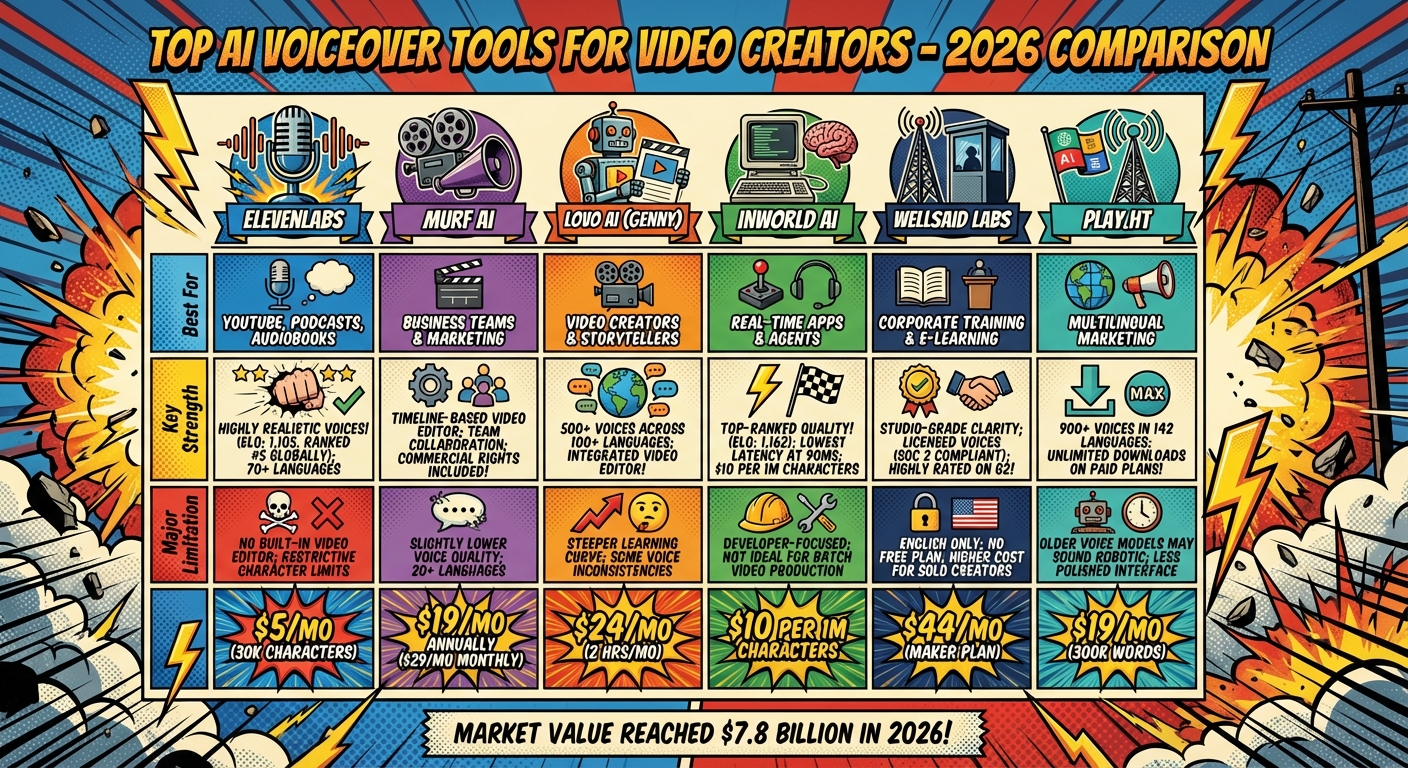
AI Voiceover Tools Comparison Chart for Video Creators 2026
The AI voiceover market experienced a major boom in 2026, with its value reaching $7.8 billion and growing quickly. What once cost over $500 per hour for professional voice talent is now available for as little as $5 per month. Here’s a closer look at how the leading platforms compare for video creators.
Tool Comparison Chart
The table below highlights six popular AI voiceover tools, showcasing their strengths, limitations, and pricing. Each platform caters to different types of creators, from solo YouTubers to large corporate teams.
| Tool | Best For | Key Strength | Major Limitation | Starting Price |
|---|---|---|---|---|
| ElevenLabs | YouTube, Podcasts, Audiobooks | Highly realistic voices (ranked #5 globally with an ELO of 1,105); supports 70+ languages | No built-in video editor; restrictive character limits | $5/mo (30k chars) |
| Murf AI | Business Teams & Marketing | Timeline-based video editor; team collaboration; commercial rights included | Slightly lower voice quality; supports 20+ languages | $19/mo annually ($29/mo monthly) |
| Lovo AI (Genny) | Video Creators & Storytellers | 500+ voices across 100+ languages; integrated video editor | Steeper learning curve; some voice inconsistencies | $24/mo (2 hrs/mo) |
| Inworld AI | Real-Time Apps & Agents | Top-ranked quality (ELO of 1,162); lowest latency at 90ms; $10 per 1M characters | Developer-focused; not ideal for batch video production | $10 per 1M chars |
| WellSaid Labs | Corporate Training & E-Learning | Studio-grade clarity; licensed voices (SOC 2 compliant); highly rated on G2 | English only; no free plan; higher cost for solo creators | $44/mo (Maker plan) |
| Play.ht | Multilingual Marketing | 900+ voices in 142 languages; unlimited downloads on paid plans | Older voice models may sound robotic; less polished interface | $19/mo (300k words) |
This breakdown provides a clear view of how each tool aligns with specific needs, making it easier to choose the right one for your workflow.
Real-World Impact:
In early 2026, Talkpal AI, a language learning platform with over 5 million users, transitioned to Inworld TTS. A/B testing over four weeks showed a 40% reduction in costs, a 7% increase in feature usage, and a 4% rise in user retention. Similarly, Bible Chat leveraged Inworld’s voice tools to scale its features to millions of users while slashing operational costs by over 90%.
Standout Features Worth Noting
Each tool offers unique features that cater to specific production needs, and their real-world applications highlight their potential.
ElevenLabs stands out for its emotional realism. Its Multilingual v2 model is so convincing that 68% of listeners in blind tests mistook it for human recordings. Its voice cloning feature only requires 1–3 minutes of audio, allowing creators to easily replicate their own voice. However, it lacks an integrated editor, so users need to export and sync audio manually.
Murf AI and Lovo AI bridge this gap by combining voice generation with timeline-based video editing. Murf’s collaboration features are perfect for marketing teams managing multiple projects, while Lovo’s extensive voice library offers storytellers and animators a wide range of expressive options. As Sakshi Jonwal of Young Urban Project says:
"Murf feels more like a mini production suite than just a voice tool".
For creators prioritizing speed and affordability, Inworld AI has redefined pricing. Voice API costs have dropped from over $200 per million characters to just $10 per million in 2026, with Inworld leading the charge. Its Cartesia Sonic 3 system delivers ultra-low latency of 90ms, making it an excellent choice for real-time applications like live streaming or interactive agents.
WellSaid Labs takes a different approach by focusing on licensed, professional-grade voices. This makes it a go-to choice for enterprises that prioritize compliance and IP security. As the WellSaid team puts it:
"In 2026, organizations expect AI voices to operate as dependable infrastructure rather than experimental features".
However, WellSaid’s English-only focus and starting price of $44 per month may make it less appealing for solo creators.
Lastly, Play.ht is notable for its massive voice and language options, supporting 142 languages with unlimited downloads on paid plans. It’s ideal for global campaigns or large-scale translation projects. That said, its older voice models can sound robotic compared to newer options like ElevenLabs or Murf, so testing is essential before committing.
Adding AI Voiceovers to Your Video Workflow
Basic Text-to-Speech Workflow
AI voiceovers can streamline video creation, saving you time and effort. To get the best results, plan your voiceover timing before locking in your visuals. This ensures the narration feels natural and guides the flow of your video.
When writing your script, aim for a conversational tone. Keep sentences short – between 8 and 15 words – and use contractions to make the narration easy to follow. Sanden Totten puts it perfectly:
"When you start writing for voice, you need to ditch all of that [traditional writing]. The focus is on making content sound natural when spoken aloud."
To make the narration smoother, add commas or ellipses to indicate pauses. For tricky words, like technical terms or brand names, spell them out phonetically. For example, write "fifteen hundred" instead of "1,500" or break "NASA" into "N, A, S, A."
Once your AI-generated audio is ready, export it as a high-quality WAV or MP3 file. Import this file into your editing software – whether you’re using Premiere Pro, CapCut, or iMovie – and place it on a separate audio track from your background music. Use the waveform view and snapping tools to align the narration with your visuals. What used to take days or even weeks with traditional voiceovers can now be done in under 30 minutes for a 90-second clip.
With the audio in place, the next step is to refine its pacing so it syncs perfectly with your video.
Editing for Natural Pacing and Timing
After generating the raw audio, focus on polishing its flow. Instead of testing with short clips, create a full-length narration for a 5-minute test. This helps you catch issues like a flat tone or loss of energy over longer sections.
When reviewing the audio, listen at normal speed using headphones. Speeding up playback might make it harder to notice awkward pauses or breathing artifacts. If parts sound rushed or dull, regenerate those sections, tweaking pitch or speed settings for a better result.
Most modern tools let you fine-tune pauses manually or use SSML tags to control timing. If you’re using platforms like LOVO or Pictory, features like "Adjust scene duration" can automatically sync visuals with your AI-generated audio, saving you from tedious manual edits.
Studies show that high-quality voiceovers can keep viewers engaged 88% longer on platforms. Often, what sets professional videos apart isn’t just the AI tool you choose but how well you refine the pacing and timing of your narration. These small adjustments can make all the difference.
Advanced Techniques for Professional Results
Voice Cloning and Emotional Customization
Voice cloning technology has come a long way. Today, it takes just 3 seconds for basic voice replication and about 30 seconds for professional-grade results – a massive improvement compared to 2023.
These systems create a "digital fingerprint" of your voice by capturing elements like timbre, resonance, and even subtle vocal fry. To achieve professional-quality results, fine-tuning is crucial. Adjust the stability setting to a range of 0.3 to 0.6 for natural-sounding variation – anything above 0.7 can make the output sound robotic. Similarly, keep the similarity boost between 0.7 and 0.85 to align with your reference audio without overfitting, which can lead to a mechanical tone if pushed beyond 0.9.
Want to add emotional depth? Use tags like [excited], [whisper], or [empathy] directly in your script. These context-aware markers can significantly improve listener engagement, boosting retention rates by 2–4×. If you’re working to establish a consistent brand voice, aim to provide at least 30 minutes of clean, varied recordings in a quiet environment. This ensures accuracy levels of 95–99%.
| Feature | Instant Cloning | Professional Cloning |
|---|---|---|
| Audio Required | 3–30 seconds | 30 minutes to 3 hours |
| Accuracy | 70–85% | 95–99% |
| Best Use Case | Prototyping, social clips | Audiobooks, brand identity, ads |
Once you’ve mastered cloning, you can take it a step further by automating voiceover production.
Automating Voiceover Generation with APIs
To streamline your workflow, combine voice cloning with text-to-speech (TTS) APIs. These tools allow you to generate audio files directly from scripts without needing a recording studio.
Platforms like Shotstack, Creatomate, and JSON2Video integrate TTS with video editing, creating a seamless production pipeline. Here’s how it works: submit your script to a TTS API, retrieve the generated audio URL, and sync it with your video editor.
A standout example comes from Fabler MB, which, in September 2025, used Resemble AI‘s zero-shot voice cloning API to develop a personalized bedtime story app. Parents recorded just 25 sentences to create detailed voice models, resulting in over 100 cloned voices and earning the app a 4.8 rating on the App Store. By employing webhooks, the platform automatically notified users when their videos were ready.
For smoother production, break longer scripts into manageable chunks of 80–100 words for better timing control. Additionally, use caching to avoid regenerating the same audio repeatedly, saving both time and resources.
Using Serve No Master Resources
If you’re serious about integrating these advanced techniques into your business, the right training can make all the difference.
Serve No Master offers courses that cover AI tools, business automation, and creating digital products. These resources are especially helpful if you’re building a video production business designed to generate passive income. The platform also provides actionable advice on incorporating AI voiceovers into scalable, location-independent business models. A free resource, "ChatGPT Profits", includes 25 business use cases and step-by-step prompts to kickstart your automation journey.
Conclusion
AI voiceovers have come a long way from the stiff, robotic narrations of the past. Modern neural voice synthesis delivers natural pauses, expressive tones, and even subtle breathing sounds, bringing a polished, professional touch to your content. With production costs slashed by over 90% and turnaround times reduced from days to mere minutes, creators can now translate their work into multiple languages almost instantly. It’s a game-changer for anyone looking to scale their content efficiently.
But the real win isn’t just about cutting costs – it’s about increasing output without compromising quality. Many creators using AI-driven workflows have managed to triple their content uploads, growing both their audiences and revenue streams in the process. This guide has highlighted how AI voiceovers transform production through affordability, speed, and new monetization opportunities.
Ready to leave the job you hate and find the fastest path to online wealth? Learn the best asset you have right now to leverage income and build financial run way in my bestseller "Fire Your Boss." Click here to download the book for free.
In July 2025, YouTube clarified its stance, confirming that AI-voiced content is fully monetizable as long as it’s paired with original scripts and human oversight. This update clears up past uncertainty and opens the door for creators producing everything from tutorials to ads, e-learning modules, and social media content. AI voiceovers provide the consistency and adaptability required to craft a recognizable and scalable brand identity.
To get started, test a handful of tools (3–5 is a good range) with real projects. Check that your chosen platform integrates smoothly with your video editor, then refine your process based on audience feedback. When crafting scripts, aim for short, conversational sentences, and try adding emotion tags like [excited] or [whisper] to make the narration feel more human. Don’t forget to layer background music at about 20% volume to soften the synthetic tone and create a balanced soundscape.
For those focused on building passive income streams, Serve No Master offers resources on AI tools, automation, and digital product creation. Their free "ChatGPT Profits" guide includes 25 business ideas and step-by-step prompts, helping you integrate AI voiceovers into a scalable workflow that supports a location-independent lifestyle. By embracing AI voiceovers, you can future-proof your production process and expand your brand’s reach around the globe.
FAQs
How can I make an AI voiceover sound more natural?
To give an AI voiceover a more lifelike touch, pay attention to prosody, pauses, and personality. Write scripts that feel conversational – use contractions, sprinkle in natural hesitations, and clearly indicate emotional tones. Tweak the pitch, pacing, and emphasis, and don’t forget to include pauses where they’d naturally occur in speech. These small adjustments can make the voiceover feel far more engaging and relatable.
Will YouTube monetize videos with AI voiceovers?
Yes, YouTube plans to monetize videos featuring AI voiceovers in 2026, as long as the content is original, engaging, and offers genuine value to viewers. To qualify, steer clear of generic, mass-produced, or repetitive material that could undermine your chances of monetization.
What’s the safest way to use voice cloning legally?
To use voice cloning responsibly and within the law, always secure explicit, written consent from the individual whose voice you plan to replicate. Make sure your actions align with legal requirements, such as the NO FAKES Act, and uphold ethical standards. Additionally, stay aware of platform-specific policies – like YouTube’s rules against impersonation and deceptive practices – to avoid any violations. By prioritizing transparency and adhering to these guidelines, you can steer clear of disputes and maintain trust in your work.
Related Blog Posts
- Step-by-Step AI Podcast Workflow
- AI Tools for Personal Branding and Networking
- ChatGPT vs. Claude: Blog Formatting Comparison
- How to Build an AI Decision Framework
Ready to leave the job you hate and find the fastest path to online wealth? Learn the best asset you have right now to leverage income and build financial run way in my bestseller "Fire Your Boss." Click here to download the book for free.