
Using ChatGPT for Audience Analytics
ChatGPT can transform how you analyze your audience, saving hours of manual work and providing actionable insights. Whether you’re a small business owner or a marketer, here’s how you can make it work for you:
- What it does well: ChatGPT quickly identifies patterns in qualitative data like customer reviews, surveys, and social media comments. It organizes unstructured data into clear outputs such as buyer personas and pain-point maps.
- What it can’t do: It doesn’t pull live data, integrate directly with tools like Google Analytics, or guarantee accuracy in all findings. Always double-check outputs.
- How to prepare your data: Clean and anonymize it to protect privacy. Use structured formats like .CSV files and include clear headers and a data dictionary.
- Key use cases: Analyze feedback, build audience segments, create data-driven personas, and craft personalized messages for better engagement.
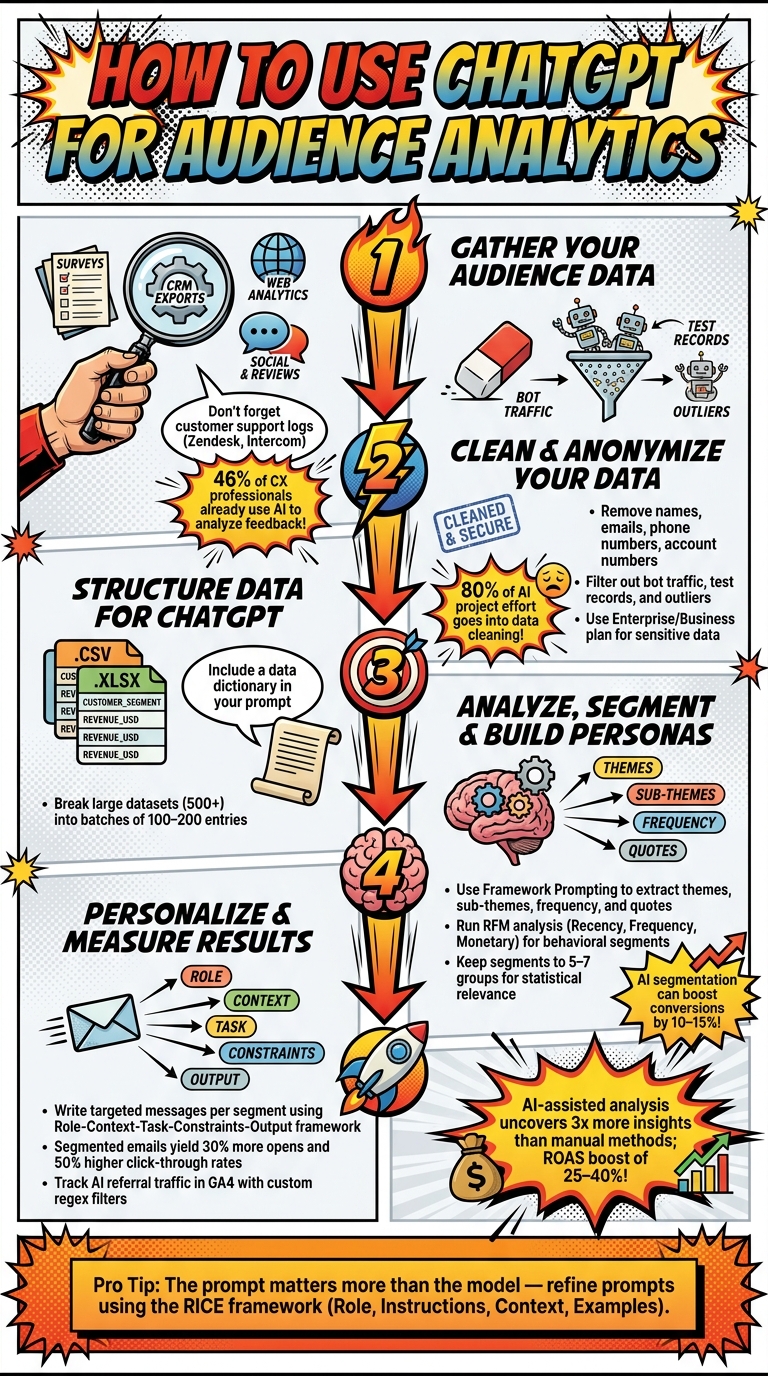
How to Use ChatGPT for Audience Analytics: Step-by-Step Workflow
Preparing Your Audience Data for ChatGPT
Where to Find Your Audience Data
Your business likely has more audience data than you realize – it’s just sitting in different tools, waiting to be put to use. The key is knowing where to look. Here are four primary sources to tap into:
| Data Source | Purpose | Key Metrics to Extract |
|---|---|---|
| Surveys (Google Forms, Qualtrics) | Gather qualitative insights | NPS/CSAT scores, open-text responses |
| CRM Exports (HubSpot, Salesforce) | Segment customer behavior | Lifetime value, purchase frequency, churn signals |
| Web Analytics (Google Analytics 4) | Understand intent and activity | Traffic source, bounce rate, conversion paths |
| Social & Reviews (LinkedIn, Yelp) | Gauge sentiment and context | Brand sentiment, pain points, competitor mentions |
Don’t forget about customer support logs. Platforms like Zendesk or Intercom hold valuable insights into recurring frustrations and pain points. In fact, as of March 2026, nearly half (46%) of customer experience professionals are already using AI tools like ChatGPT to analyze this type of feedback. Once you’ve gathered your data, the next step is preparing it properly to ensure ChatGPT delivers accurate and meaningful analysis.
How to Clean and Anonymize Your Data
Data preparation isn’t glamorous, but it’s the backbone of any successful AI analysis. Experts estimate that 80% of the effort in AI projects goes into cleaning and organizing data. Skipping this step can lead to inaccurate results – or worse, privacy issues.
Start by removing personal identifiers like names, emails, phone numbers, and account numbers before uploading anything to ChatGPT. This step is essential not just for maintaining trust but also for meeting privacy regulations like GDPR. Additionally, filter out irrelevant data – such as internal test records, bot traffic, and outliers that don’t reflect typical customer behavior.
Ready to leave the job you hate and find the fastest path to online wealth? Learn the best asset you have right now to leverage income and build financial run way in my bestseller "Fire Your Boss." Click here to download the book for free.
One crucial detail: Personal ChatGPT accounts may use uploaded data for model training. To avoid this, opt out in the settings or use an Enterprise/Business plan for handling sensitive customer data.
How to Structure Data for ChatGPT
The structure of your data is just as important as its content. ChatGPT works best with structured files like .CSV or .XLSX, where each row represents a single record and the first row contains clear column headers. Examples of effective headers include customer_segment, revenue_usd, or survey_date.
When preparing your data for ChatGPT, include a brief data dictionary in your prompt. This is a simple explanation of what each column represents and the timeframe the data covers. For instance, it can clarify that time_days refers to the number of days since a customer’s last purchase. This prevents misinterpretation and ensures a smoother analysis.
For qualitative data like survey responses or customer reviews, label entries with details like source type, customer segment, and date. This allows you to filter responses later based on specific groups or timeframes. If you’re dealing with a large dataset – say, more than 500 responses – break it into smaller batches of 100 to 200 entries. This helps maintain the quality of analysis without overwhelming the system.
Using ChatGPT to Pull Insights from Audience Data
Analyzing Qualitative Feedback with ChatGPT
Once you’ve prepped your data, the next step is turning raw responses into useful insights – and this is where ChatGPT shines. It doesn’t just count keywords; it interprets the context. For instance, a comment like, “I had to call three times,” isn’t just about the word “call” – it’s a clear indicator of customer frustration.
To get the most out of ChatGPT, use Framework Prompting. Instead of asking for a generic summary, structure your request to analyze themes, signals, and entities all at once. Here’s an example of an effective prompt:
"Act as a customer insights analyst. Analyze 150 survey responses and list the 5 most frequent themes, ranked by frequency. For each theme, provide a descriptive label, a 1–2 sentence explanation, sub-themes, and 2–3 representative quotes."
Ask for the results in a table format with columns like Theme, Sub-themes, Frequency, and Representative Quotes. This approach keeps the findings actionable. Interestingly, about 29% of open-ended responses often include mixed sentiment – positive on one topic but negative on another. Framework Prompting helps identify these nuances and highlights overlapping themes. You can then refine the output further by merging similar themes (e.g., combining “user permissions” and “user roles”) into a cohesive report.
These insights are a solid foundation for segmenting your audience in ways that actually reflect their experiences and needs.
Building Audience Segments with ChatGPT
ChatGPT can take your audience data and uncover strategic clusters. By feeding it your CRM export, you can ask it to identify 4–6 distinct behavioral groups, pointing out the data signals that differentiate each one. Here’s a prompt that works well:
"Act as a Senior Data Analyst. Analyze this CRM dataset and identify natural customer clusters. Describe the defining characteristics, purchase behavior, and estimated lifetime value of each segment."
One effective method is RFM analysis – grouping customers by Recency, Frequency, and Monetary spend. This allows ChatGPT to surface groups like “high-value loyalists” or “at-risk churners,” which traditional demographic filters might miss. Research suggests that AI-driven segmentation can lead to a 10–15% increase in verified conversions compared to traditional rule-based targeting.
That said, always validate AI-generated segments against your actual CRM data. If a segment size is off by more than 10%, it might be identifying a pattern that doesn’t actually exist. Keeping your segments within 5 to 7 groups ensures they’re large enough to be statistically relevant when testing targeted messaging.
Once you’ve nailed down your segments, the next step is crafting detailed personas that reflect the real attributes of your audience.
Creating Audience Personas from Real Data
Personas based on real data are far more effective than made-up archetypes. By using validated segmentation and actual customer feedback, you can create profiles that genuinely represent your audience. ChatGPT works best when it’s fed real inputs – like customer reviews, survey responses, or support transcripts – not when it’s asked to invent personas out of thin air.
"The secret to using ChatGPT for audience research is feeding it REAL DATA (customer reviews, interview transcripts, social media comments), then prompting it to organize, analyze, and synthesize that data." – Narayanan, OpenCraft AI
For example, if you’re targeting U.S.-based professionals, try this prompt:
“Analyze these 50 customer reviews and create 3 buyer personas in a table format. Include age range, professional role, primary goals, key blockers, and trust triggers.”
The result? Personas grounded in what your customers actually say, not what you assume they think.
This approach isn’t just theoretical. Entrepreneurs using platforms like Serve No Master rely on this exact strategy. By analyzing real audience data, they uncover the motivations of professionals (often 40+) who want to leave traditional jobs. That clarity shapes everything – from content to product design – and it’s all thanks to insights drawn from real customer input, not guesswork.
Personalizing Customer Interactions Using ChatGPT Insights
Once you’ve mapped out your audience segments and personas, the real value comes from transforming those insights into messages that drive results.
Writing Targeted Messages for Each Segment
With your segments and personas in place, your next step is crafting messages that address each group’s unique needs. Generic messaging? It just doesn’t cut it anymore. Instead, tap into what you know about your audience to create messages that feel personal and relevant.
Here’s a helpful framework: Role, Context, Task, Constraints, Output. Start by instructing ChatGPT to act as a "direct response copywriter." Then, describe your audience segment in detail – age, challenges, goals – and specify exactly what you need, whether it’s a subject line, a benefit-focused statement, or even a way to handle objections. The more precise your prompt, the better the results.
"The difference in output quality between ‘write me a campaign concept’ and a prompt that specifies the audience segment… is the difference between something you delete and something you actually use." – Eduardo Yi, Digital Marketer, ClickMinded
Here’s a pro tip: before writing any copy, ask ChatGPT to list the top 10 objections your target audience might have. Use these objections to shape your messaging. For colder audiences, keep your calls-to-action simple – something like a quick yes/no question works far better than asking for a 30-minute call right out of the gate.
These finely tuned messages lay the groundwork for even more personalized communication, like tailored email campaigns.
Creating Personalized Email Versions with ChatGPT
Turning segmentation insights into effective email campaigns starts with a base email. Once you have that, let ChatGPT do the heavy lifting: "Rewrite this email for [Segment A], focusing on [specific pain point] and using a [specific tone]."
This approach works. Segmented emails created this way have seen 30% more opens and 50% higher click-through rates compared to generic campaigns. Even tweaking subject lines for specific segments has resulted in an 18% increase in click-through rates during tests.
One thing to keep in mind: ChatGPT can sometimes stray from your brand’s voice, especially with longer outputs. If you’re generating multiple email versions in one session, make sure to reintroduce your brand’s tone – or better yet, start a new chat for each segment.
But email isn’t the only place for personalization. You can also use ChatGPT to foster deeper connections in your community.
Using ChatGPT to Build Community Connections
Engaging with a community requires an authentic, human touch – and ChatGPT can help when paired with real data from your audience.
For example, input a collection of customer reviews, forum posts, or direct messages – at least 50 – and ask ChatGPT to identify the top three emotional themes. Use these insights to craft discussion prompts, write empathetic replies, or brainstorm ideas for workshops that reflect your audience’s feelings.
ChatGPT can also help you make sense of open-ended survey responses. Ask it to group responses into themes, like separating comments about "ready-to-use templates" from those about "small group feedback sessions." This makes it easier to spot what your audience values most – and what they might actually pay for. It’s not just engagement anymore; it’s an easy way to uncover product opportunities hiding in plain sight.
Tracking Results and Improving Your ChatGPT Analytics Workflow
Choosing the Right Metrics to Track
Once you’ve launched your personalized messages, it’s time to confirm that ChatGPT’s insights are delivering measurable results. Here’s a surprising stat: 68% of marketing teams don’t have access to dedicated data analysts. Yet, AI-assisted analysis can uncover three times more insights compared to manual methods.
To get started, focus on two types of metrics. The first is your standard engagement data – things like email open rates, click-through rates, and customer retention. These numbers reveal if your segmented messaging is hitting the mark. The second is AI referral traffic, which you can track in GA4. To do this effectively, create a custom channel group using a regex filter (e.g., chatgpt.com|perplexity.ai|claude.ai) and prioritize it above the default "Referral" rule. This ensures AI-driven visits are categorized correctly.
One thing to watch out for: ChatGPT’s free tier often removes referrer headers, so some AI-driven traffic might show up as "Direct." In other words, treat your AI referral numbers as a baseline, not the full picture.
"AI visibility is measurable today, with tools you already have. A spreadsheet, 10 prompts, and a GA4 segment are enough to move from ‘we have no idea’ to ‘we know exactly where we stand.’" – Zhiliang Chen, Founder, Underscore
Once your metrics are in place, focus on refining your inputs and prompts to improve your analysis.
How to Improve Your Data and Prompts Over Time
The quality of your prompts has a huge impact on the results you get. Research from MetricNexus highlights this perfectly: "The prompt matters more than the model. A $0.02/query model with the right context outperformed a $3/query model without it.". So, before upgrading tools, spend time fine-tuning your prompts.
A great way to structure your prompts is by using the RICE framework:
- Define a Role for ChatGPT.
- Give clear Instructions.
- Add Context about your business and audience.
- Include Examples of the output you’re looking for.
As you create prompts that work well, save them as reusable templates with placeholders, and document any updates. You can also take advantage of ChatGPT’s Persistent Memory or Custom Instructions features to store audience personas and brand guidelines, so you don’t have to re-upload them every time.
Don’t forget to review your prompts regularly. Up to 60% of LLM citations change monthly, meaning what worked in January might need tweaking by March.
Managing Risk and Protecting Data Integrity
Once your prompts are optimized, it’s crucial to address risks that could affect the accuracy of your data.
For starters, ChatGPT isn’t perfect with calculations. In a test involving 193 marketing analytics questions, GPT-4o scored below 40% on basic calculations like CPA and ROAS when it wasn’t using code execution. To avoid errors, ask ChatGPT to write and run Python code for calculations instead of relying on its "mental math".
"AI tools can hallucinate calculations, especially with large datasets or complex multi-step analyses. Always spot-check a few calculations manually." – Maria Carpena, Lead Emerging Trends & Research Writer, WebFX
If something feels off or doesn’t align with your business logic, double-check it before making decisions. And when it comes to sensitive data like raw CRM records or personally identifiable information (PII), never upload it to public AI tools. Instead, use ChatGPT’s Business or Enterprise tier, which ensures your data isn’t used for training. These precautions aren’t just good practice – they’re what separate trustworthy insights from decisions that could backfire.
Conclusion: Putting ChatGPT to Work for Audience Analytics
The takeaway here is simple: ChatGPT is only as effective as the data you give it. Feed it with real customer feedback, survey results, or CRM exports, and it can turn hundreds of reviews into clear, actionable themes in minutes – saving you hours of manual work. Studies show AI-assisted analysis can uncover three times more insights than traditional methods, while AI-driven audience audits can boost advertising Return on Ad Spend (ROAS) by 25–40% and cut Customer Acquisition Costs (CAC) by 15–30%.
Your process matters. From cleaning your data and structuring prompts to building personas, creating segmented messages, and analyzing GA4 metrics – everything builds on itself. The more you tweak your prompts and update personas (aim for quarterly updates), the sharper and more accurate your insights will become.
"AI does the heavy lifting. You do the thinking." – Lisa Peyton, AI Marketing Consultant
This balance between AI efficiency and your strategic judgment is key. It’s not just about automation; it’s about using AI to amplify your ability to make smarter, faster decisions.
If you’re ready to dive deeper into applying AI tools to streamline your business, Serve No Master offers training and resources tailored for entrepreneurs. The platform focuses on practical skills like audience research, AI-powered content creation, and business automation – all designed to help you build a more independent and efficient business.
Start small – one dataset, one prompt, one insight – and watch how it grows from there. The possibilities are endless.
Ready to leave the job you hate and find the fastest path to online wealth? Learn the best asset you have right now to leverage income and build financial run way in my bestseller "Fire Your Boss." Click here to download the book for free.
FAQs
What data should I avoid uploading to ChatGPT?
Avoid sharing sensitive details such as personally identifiable information (PII) – this includes names, email addresses, phone numbers, and physical addresses. Similarly, steer clear of uploading financial records, proprietary source code, or trade secrets. If you absolutely need to analyze data, make sure to anonymize it by swapping out identifiers with encrypted tokens or summarizing it into overall figures. Also, double-check your account’s privacy settings – some plans may automatically opt your data into AI training by default.
How many rows or responses can I analyze at once?
When it comes to analyzing data, there’s no hard cap on the number of rows or responses ChatGPT can process – it all depends on the complexity of the file, token limits, and how the system performs. While it’s capable of handling files with as many as 100,000 rows, you might notice slower performance with particularly large or intricate datasets. To keep things running smoothly, consider breaking large files into smaller chunks or narrowing your focus to specific rows or columns when necessary.
How do I validate ChatGPT’s segments and insights?
When using ChatGPT, think of its outputs as starting points, not final answers. Always cross-check the insights it provides against your actual customer data and the specifics of your business. AI-generated results should go through a human review process before being used.
Here’s how to approach it:
- Ask for Clarifications: If something seems off, ask ChatGPT to explain its reasoning, assumptions, or calculations. It can help you understand how it arrived at its conclusions.
- Spot Ambiguities: AI isn’t perfect – it might misinterpret or gloss over certain details. Make sure to identify any unclear points or potential errors.
- Compare with Your Expertise: Use your domain knowledge to verify the accuracy and relevance of the output. AI can assist, but your experience is what ensures the results make sense.
By treating AI as a collaborator rather than an authority, you can turn its drafts into actionable insights that align with your goals.
Related Blog Posts
- How Do I Create Passive Income Streams? 8 Answers
- How ChatGPT Helps Identify Profitable Niches
- ChatGPT vs. Claude: Blog Formatting Comparison
- ChatGPT vs. Claude: Best for Community Content
Ready to leave the job you hate and find the fastest path to online wealth? Learn the best asset you have right now to leverage income and build financial run way in my bestseller "Fire Your Boss." Click here to download the book for free.